Hi, there!
I am new in this forum and have few knowledge about programming.
I needed some help when I used the OCS for the first time and invited one person to be a site administrator. I am an owner of the web where the System was installed and then used for hosting the PSST conferences (the-psst.com). It worked perfectly!
After holding various editions I want to change the Administrator for this conference site. I want to take over the PSST conferences and change the initial Administrator selected at the beginning to myself. How I can do it? Could you help me?
Thank you in advance,
Eugenia
Hi @eumat,
There are two options, each with a couple of discussions in the forum:
- Change the old administrator’s account and continue using it (see e.g. https://pkp.sfu.ca/support/forum/viewtopic.php?f=8&t=6582)
- Create another administrator account
I suspect the first is the best option. Note that the SQL queries in the above link assume MD5 encryption; you’ll likely be using SHA1 encryption. You can check the encryption setting in your config.inc.php to be sure.
Regards,
Alec Smecher
Public Knowledge Project Team
Hi!
How can I create a second Site Administrator? [version: 3.0.0.0.] the table roles doesn´t exist.
Hi @Evandro_Souza,
Check what the user group ID of your administrators group is by running:
SELECT user_group_id FROM user_groups WHERE context_id=0 AND role_id=1;
It’ll probably give you a 1 back as a result. Then, you can grant that to your user:
INSERT INTO user_user_groups (user_id, user_group_id) VALUES (1234, 1);
…where 1234 is your user ID, and 1 is the user_group_id you got from the first query (probably a 1).
Regards,
Alec Smecher
Public Knowledge Project Team
This too worked for me. A++ would admin again. Thanks, @aschemer! 
Hi @asmecher,
Could I add another Site Administrator, if I haven’t got access to OCS files? I’m only administrator of the conference. I have got conference manager and site administrator roles.
Regards
Tautvydas
In order to grant another Site Administrator, you’ll need access to your database (e.g. through a tool like phpMyAdmin). This is usually part of a CPanel login on a typical server.
Regards,
Alec Smecher
Public Knowledge Project Team
Dredging up this thread, but I’m hitting an error.
mysql> INSERT INTO user_user_groups (user_id, user_group_id) VALUES (ndp, 1); ERROR 1054 (42S22): Unknown column 'ndp' in 'field list'
ndp is my username, I’m running OJS 3. Any ideas?
In SQL, string constants must be enclosed in quotes, as VALUES ("ndp", 1) for example. In this particular case, you need to use the numeric identifier for the user, not the username.
Duh! I’m stupid. Thanks.
I had to promote an user to admin in order to use the translation plugin, did the SQL to insert its ID on admins user_user_group, but that didn’ work.
Am I missing anything? OJS 3.1.2-1
Hello, (I would like to correct my post, now that I have better understanding of the issue)
I have OJS ojs-3.3.0-20 hosting is multi-sites version.
I ran the same command where 1234 is your user ID, and 1 is the user_group_id you got from the query (SELECT user_group_id FROM user_groups WHERE context_id=0 AND role_id=1;)
INSERT INTO user_user_groups (user_id, user_group_id) VALUES (1234, 1);
Issue is: I do not know why the third option link ‘Administration‘ is not showing in the dropdown navigation under my username when hover over. This makes me think I am not the admin - HOWEVER if I navigate to one of the journals, I see the Administration under tools and I can access all the admin functions. Any feedback or explaination is highly appreciated. I ran a check command:
SELECT u.username, uug.user_group_id, ug.role_id, ug.context_id
FROM users u
JOIN user_user_groups uug ON u.user_id = uug.user_id
JOIN user_groups ug ON uug.user_group_id = ug.user_group_id
WHERE u.username = ‘mynewadmin’;
And it did returned in result:
role_id = 1 and context_id = 0
Again, I am not sure why the ‘Administration‘ is not shown other than that everything else seems to be ok!
This highlighted red is what missing:
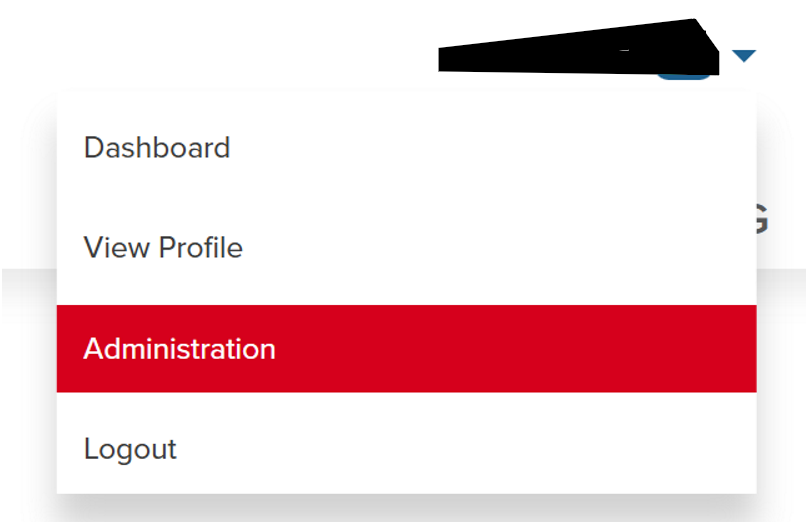
Thanks!
Dung.