I tested this on 3.5.0-1 and could not replicate it - it worked okay for me. Maybe you could specify what exact steps you’re taking and the results your seeing? Do they jumble in a different manner every time?
Might also be worth clearing your browser cache in case this is affecting things?
Sometimes it stays normal. When I refresh the page, every time the order changes in a different manner. We have multiple OJS installations. It happens on every site.
I am using QuickSubmit plugin to publish the articles.
Are there some articles without page numbers in the issue?
Sometimes it helps to order the articles (or just shift one article to another position, then Save) in the issue so that the internal sequence numbers are applied.
Please also check the order of your journal sections - they may influence overall order of the articles.
I had a similar but different problem with OJS 3.0.0 and the issue order - every time I refreshed the page with the issues they got reordered in a seemingly random fashion. And I couldn’t order them via the web interface because the introduced changes weren’t permanent. In the end, I found out that the confusion was caused by two issues with the same order (sequence number) in the database table, so I had to alter the order manually via several requests like
update custom_issue_orders set seq=11 where issue_id=23;
So you may want to look into the database. Unfortunately, I don’t know for sure how the article orders are stored, so I can only guess. Maybe you can try running something like
select publication_id, seq from publications where issue_id=1;
with the id of your problem issue and see if the sequence makes sense.
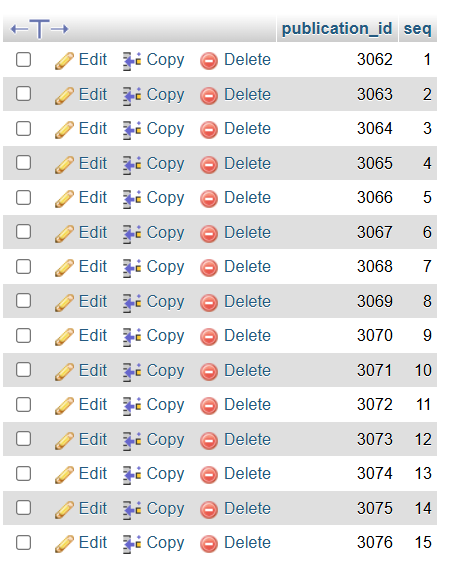
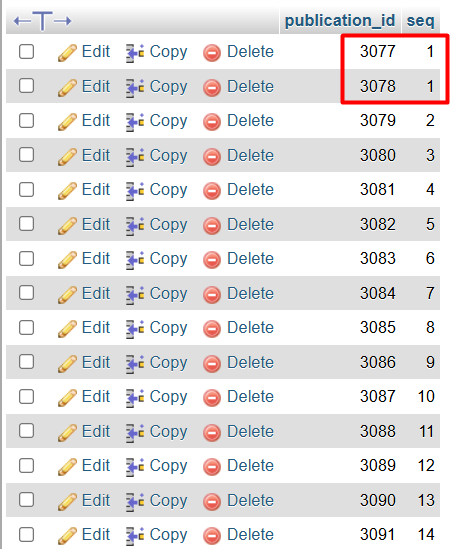
Thank you for the advice. I have gone through it. See screenshots.
There is a duplicate seq numbers. Also i have identified on the frontend, where the duplicate seq is showing, the publication_id starts at 3075, but after running the query, it starts at 3077. and i found 3075 in the previous issue with seq 14. Infact, the previous issue ended with 3074. But here its showing upto 3076. Next issue started with 3075, but its not showing in the query result.
Can you trace out the issue and suggest how to proceed.
…actually, it’s rather submission_id, not publication_id that shows up in the URLs so maybe that’s why your numbers may be different from what you see in the frontend - you can check if this is so. Does the quantity of the publications (15 for both issues?) match what you see in the frontend?
With my test installation, I found it rather hard to reproduce the “article order randomly changes when I refresh the webpage” problem - sometimes when I set the seq of three articles to the same integer they do jump around, and sometimes they don’t. It may well be that if the page is cached the results seem consistent.
In any case, I guess that within one section of one issue there should be no duplicate seq numbers for the published articles. If your 3077 and 3078 publications are indeed in one section of one issue, you can try modifying one of them (e.g., to 15) so that all seqs are in sequence and see if the problem persists.