Another upgrade from 3.3 to 3.4 issue - fails with error about dois table. How to continue?

Describe the issue or problem
I’m upgrading a journal from ojs 3.3 to ojs 3.4.0.14 - unfortunately I receive an error where I can’t figure out how to continue.

Steps I took leading up to the issue
For example:

  1. I created a docker image for OJS 3.4.0.3 (setting up a new journal works fine)
  2. adjust config.inc.php to point to the database, place contents of old public and files folders
  3. use the command php tools/upgrade.php upgrade
  4. wait for a few minutes
    Get the error:
A database error has occurred: SQLSTATE[22P02]: Invalid text representation: 7 ERROR: invalid input syntax for type bigint: "" CONTEXT: unnamed portal parameter $2 = '' (SQL: update "dois" set "status" = 3 where "doi_id" = )

the database then is in a broken state and needs to be recovered from backup.

What application are you using?
OJS 3.3.0-14

Additional information
In case it matters this journal was originally created some years ago by someone else under OJS 2 and gradually upgraded to ojs 3.3. Database is postgres9. Currently seems to run fine. It originally shared the server with several other journals which have moved to separate installations.

output php tools/upgrade.php check:

php tools/upgrade.php check
Code version:      3.4.0.3
Database version:  3.3.0.14
Latest version:    3.4.0.3
Database version is older than code version
Run "tools/upgrade.php upgrade" to update

I had some more issues that had a clear message how to resolve:

  • one complaining about files in usageStats/usageEventLogs - the message said to delete them
  • one about setting Contact name and email for journal “test”.

some more log lines in context: (truncated as there is a looong list of removed entries)

...
2023-11-14 10:34:15 [334732 entries removed]
2023-11-14 10:34:15 [Removing orphaned entries from "user_user_groups" with an invalid value for the required column "user_id". The following IDs do not exist at the reference table "users":
1720, 1722]
2023-11-14 10:34:15 [4 entries removed]
2023-11-14 10:34:15 [Removing orphaned entries from "completed_payments" with an invalid value for the required column "context_id". The following IDs do not exist at the reference table "journals":
10, 16]
2023-11-14 10:34:15 [34 entries removed]
2023-11-14 10:34:15 [Removing orphaned entries from "publication_galley_settings" with an invalid value for the required column "galley_id". The following IDs do not exist at the reference table "publication_galleys":
2260, 2286, 2297, 2302, 2394, 2417, 2418, 2419, 2422, 2423]
2023-11-14 10:34:15 [17 entries removed]
2023-11-14 10:34:15 [migration: PKP\migration\upgrade\v3_4_0\I8060_UpdateUserLocalesDefaultToEmptyArrayFromNull]
2023-11-14 10:34:15 [migration: PKP\migration\upgrade\v3_4_0\I7245_UpdateUserLocaleStringToParsableJsonString]
2023-11-14 10:34:20 [migration: APP\migration\upgrade\v3_4_0\I7129_IssueEntityDAORefactor]
2023-11-14 10:34:20 [migration: APP\migration\upgrade\v3_4_0\I6091_AddFilterNamespaces]
2023-11-14 10:34:20 [migration: APP\migration\upgrade\v3_4_0\I3573_AddPrimaryKeys]
2023-11-14 10:34:23 [migration: APP\migration\upgrade\v3_4_0\I6093_AddForeignKeys]
2023-11-14 10:34:24 [migration: APP\migration\upgrade\v3_4_0\MergeLocalesMigration]
2023-11-14 10:34:44 [migration: PKP\migration\upgrade\v3_4_0\FailedJobsMigration]

I have found that the error occurs in the file classes/migration/upgrade/v3_4_0/I7014_DoiMigration.php.

I can get it to successfully execute if I add at line 462 (just before the foreach)

unset($statuses[""]);
unset($registrationAgencies[""]);

not sure yet if this is safe.

Hi @cager,

Thanks for sharing the details.

I’m not sure yet why this would be happening, but I’ve seen a similar issue pop up where the issue was happening a few lines below where yours seems to be failing—both related to an empty doi_id:

You mentioned using unset() allowed things to continue. Did you notice that there was an empty string in those arrays?

It seems like something is happening where a doi_id is empty or not being set properly. Could you try running the upgrade with this added on line 446 (just after the beginning of the for loop?

if (!is_int($item['doi_id'])) {
    var_dump($item);
}

Similarly could you try adding this on line 465 just after the beginning of the for loop?

if (!is_int($doiId)) {
    var_dump($insert);
}

Could you report back on if this adds anything to the upgrade output? This should help narrow down what might be causing this.

Regards,

Erik
PKP Team

thanks for responding.

I added the suggested lines.

about the first snippet (line 446)
it outputs about 3600 lines like these (lines 200-3855, so 457 such blocks):

array(3) {
  ["doi_id"]=>
  NULL
  ["datacite::registeredDoi"]=>
  string(26) "10.15203/ozp.748.vol29iss3"
  ["datacite::status"]=>
  string(10) "registered"
}

I was checking a few in the journal in the 3.3 instance - the articles in these issues don’t have dois assigned there, these dois also are not registered.

The second snippet (line 465) - just one block:

array(1) {
  ["status"]=>
  int(3)
}

and then there follows:

... some successful reverts ...
2023-11-17 08:25:48 [downgrade for "app\migration\upgrade\v3_4_0\mergelocalesmigration" unsupported: downgrade not supported]
error: upgrade failed: db: sqlstate[22p02]: invalid text representation: 7 error:  invalid input syntax for type bigint: ""
context:  unnamed portal parameter $2 = '' (sql: update "dois" set "status" = 3 where "doi_id" = )

Hi @cager,

Thanks for sharing those details. It looks like there are entries in your database for Datacite when the DOIs don’t exist on the OJS side of things. When an article DOI is created in OJS, it’s stored in the publication_settings table with a setting_name of pub-id::doi. When the DOIs are registered with Datacite, they will have two rows added to the submission_settings table—one with a setting name of datacite::registeredDoi and another with a setting name of datacite::status.

If you run the following query on your pre-upgrade database, this should identify any submissions that have datacite information without the corresponding DOI in the database.

select submission_id from submission_settings
where setting_name = 'datacite::registeredDoi'
and setting_value not in (
    select setting_value from publication_settings
    where setting_name = 'pub-id::doi'
);

This will get back a list of any submission IDs that have Datacite information in the submission_settings table but do not have a corresponding pub-id::doi entry in the publication_settings table.

For each of the submission IDs this returns, you will need to clean up any row in the submission_settings table that has a setting name of datacite::registeredDoi or datacite::status. You will, of course, want to make sure none of these DOIs are registered and supposed to exist in the publication_settings table before removing them.

Hope that helps.

Best,
Erik

Hi, the answer was most informative. Yes - I had datacite entries for all the doi-less articles and they seemed to cause the trouble. If I delete them the upgrade script runs without issue.

It should be good enough for us to just weed them out. worst case the responsible person needs to resubmit a few dois.

In case anyone has the same issue I used the query:

DELETE FROM submission_settings AS ss
WHERE ss.setting_name IN ('datacite::registeredDoi', 'datacite::status')
    AND ss.submission_id IN (
        SELECT
            submission_id
        FROM
            submission_settings
        WHERE
            setting_name = 'datacite::registeredDoi'
            AND setting_value NOT IN (
                SELECT
                    setting_value
                FROM
                    publication_settings
                WHERE
                    setting_name = 'pub-id::doi'));

now in hindsight - turns out the dois where actually successfully registered but didn’t show up in the search machine I was using. It will be more work than I originally expected to add the dois back in.

I’ll try to come up with a statement that will insert the missing ones in publication settings.

I’m currently experimenting with following query in postgres to clean things up:

INSERT INTO publication_settings (publication_id, setting_name, setting_value)
SELECT
    p.publication_id,
    'pub-id::doi' AS setting_name,
    s.setting_value
FROM
    publications p
    FULL JOIN (
        SELECT
            submission_id,
            setting_value
        FROM
            submission_settings
        WHERE
            setting_name = 'datacite::registeredDoi'
            AND setting_value NOT IN (
                SELECT
                    setting_value
                FROM
                    publication_settings
                WHERE
                    setting_name = 'pub-id::doi')) s ON s.submission_id = p.submission_id
WHERE
    s.setting_value NOTNULL;

it seems to work better - in the “delete” approach the articles without dois seemed to be missing in the “needs doi section” in the dashboard.

Hi @cager, I’m glad to hear this approach seems to be working better. Given that the DOIs were actually registered with Datacite, I would have recommended an approach similar to this. Have you run into any issues with this second approach?

Regards,

Erik
PKP Team

well… can’t really tell yet. It makes the upgrade scripts run without errors also no obvious errors browsing the site. However I have no deeper understanding about the interactions of the tables or how this mess occurred in the first place :sweat_smile:.
Will need to ask the person responsible for registering the dois if anything shows up at her end.

1 Like

I upgraded from 3.3.0.15 to 3.4.0.4, and it has these problems,
Upon reviewing your website, we have identified the following issues:

[12-Dec-2023 03:52:46 America/New_York] Exception: Plugin twitterBlock expected to inherit from TwitterBlockPlugin, actual type NULL in /home/phamho/i-jte.org/lib/pkp/classes/plugins/PluginRegistry.php:203
Stack trace:
#0 /home/phamho/i-jte.org/lib/pkp/classes/plugins/PluginRegistry.php(219): PKP\plugins\PluginRegistry::_instantiatePlugin('blocks', 'twitterBlock', 'TwitterBlockPlu...')
#1 /home/phamho/i-jte.org/lib/pkp/classes/plugins/PluginRegistry.php(112): PKP\plugins\PluginRegistry::_loadFromDatabase('blocks', NULL)
#2 /home/phamho/i-jte.org/lib/pkp/classes/template/PKPTemplateManager.php(1440): PKP\plugins\PluginRegistry::loadCategory('blocks', true)
#3 [internal function]: PKP\template\PKPTemplateManager->displaySidebar('Templates::Comm...', Array)
#4 /home/phamho/i-jte.org/lib/pkp/classes/plugins/Hook.php(139): call_user_func_array(Array, Array)
#5 /home/phamho/i-jte.org/lib/pkp/classes/plugins/Hook.php(113): PKP\plugins\Hook::run('Templates::Comm...', Array)
#6 /home/phamho/i-jte.org/lib/pkp/classes/template/PKPTemplateManager.php(1740): PKP\plugins\Hook::call('Templates::Comm...', Array)
#7 /home/phamho/i-jte.org/cache/t_compile/ef41840365eca71858acbf33bf485b9a16b48ad5^4dffb64063bb972c37e05619a2ccd9d0ea7473ac_0.app.frontendcomponentsfooter.tpl.php(29): PKP\template\PKPTemplateManager->smartyCallHook(Array, Object(Smarty_Internal_Template))
#8 /home/phamho/i-jte.org/lib/pkp/lib/vendor/smarty/smarty/libs/sysplugins/smarty_template_resource_base.php(123): content_65781f5e042c00_20398271(Object(Smarty_Internal_Template))
#9 /home/phamho/i-jte.org/lib/pkp/lib/vendor/smarty/smarty/libs/sysplugins/smarty_template_compiled.php(114): Smarty_Template_Resource_Base->getRenderedTemplateCode(Object(Smarty_Internal_Template))
#10 /home/phamho/i-jte.org/lib/pkp/lib/vendor/smarty/smarty/libs/sysplugins/smarty_internal_template.php(217): Smarty_Template_Compiled->render(Object(Smarty_Internal_Template))
#11 /home/phamho/i-jte.org/lib/pkp/lib/vendor/smarty/smarty/libs/sysplugins/smarty_internal_template.php(386): Smarty_Internal_Template->render()
#12 /home/phamho/i-jte.org/cache/t_compile/ef41840365eca71858acbf33bf485b9a16b48ad5^9d55f24f7dbae142b911fdb30617e900a52af9a4_0.app.frontendpagesissueArchive.tpl.php(89): Smarty_Internal_Template->_subTemplateRender('app:frontend/co...', NULL, 'ef41840365eca71...', 0, 3600, Array, 0, false)
#13 /home/phamho/i-jte.org/lib/pkp/lib/vendor/smarty/smarty/libs/sysplugins/smarty_template_resource_base.php(123): content_65781f5de16d89_82132619(Object(Smarty_Internal_Template))
#14 /home/phamho/i-jte.org/lib/pkp/lib/vendor/smarty/smarty/libs/sysplugins/smarty_template_compiled.php(114): Smarty_Template_Resource_Base->getRenderedTemplateCode(Object(Smarty_Internal_Template))
#15 /home/phamho/i-jte.org/lib/pkp/lib/vendor/smarty/smarty/libs/sysplugins/smarty_internal_template.php(217): Smarty_Template_Compiled->render(Object(Smarty_Internal_Template))
#16 /home/phamho/i-jte.org/lib/pkp/lib/vendor/smarty/smarty/libs/sysplugins/smarty_internal_templatebase.php(238): Smarty_Internal_Template->render(false, 1)
#17 /home/phamho/i-jte.org/lib/pkp/lib/vendor/smarty/smarty/libs/sysplugins/smarty_internal_templatebase.php(134): Smarty_Internal_TemplateBase->_execute(Object(Smarty_Internal_Template), NULL, 'ef41840365eca71...', NULL, 1)
#18 /home/phamho/i-jte.org/lib/pkp/classes/template/PKPTemplateManager.php(1325): Smarty_Internal_TemplateBase->display('frontend/pages/...', NULL, 'ef41840365eca71...', NULL)
#19 /home/phamho/i-jte.org/pages/issue/IssueHandler.php(184): PKP\template\PKPTemplateManager->display('frontend/pages/...')
#20 [internal function]: APP\pages\issue\IssueHandler->archive(Array, Object(APP\core\Request))
#21 /home/phamho/i-jte.org/lib/pkp/classes/core/PKPRouter.php(334): call_user_func(Array, Array, Object(APP\core\Request))
#22 /home/phamho/i-jte.org/lib/pkp/classes/core/PKPPageRouter.php(277): PKP\core\PKPRouter->_authorizeInitializeAndCallRequest(Array, Object(APP\core\Request), Array, false)
#23 /home/phamho/i-jte.org/lib/pkp/classes/core/Dispatcher.php(165): PKP\core\PKPPageRouter->route(Object(APP\core\Request))
#24 /home/phamho/i-jte.org/lib/pkp/classes/core/PKPApplication.php(388): PKP\core\Dispatcher->dispatch(Object(APP\core\Request))
#25 /home/phamho/i-jte.org/index.php(21): PKP\core\PKPApplication->execute()
#26 {main}

How can I fix it?
Thank you

This issue is related to the database migration - it doesn’t look like it applies to your error.

However I’ve seen similar errors and this issue is related: Issue with Missing Plugins after Upgrading to OJS 3.4 - #4 by Igor
I think you need to manually remove twitterblock form the versions table.

Hello @cager

I ran into the same issue, and am wondering how you got passed this? Can you share?

Many thanks in advance!

Dung.

Hi @dung,

I need to add a disclaimer - I was messing directly with the database. If you try my solution be sure to have a backup. (e.g. perform the steps from https://docs.pkp.sfu.ca/dev/upgrade-guide/en/#4-create-backups )

I did it very dirty - here is what I did back then: I connected with a tool (i use dbeaver, but any is fine) to the database. There is a table called versions - there are columns product and product_class_name - in one of them I found the name from the error message. It was sufficient to delete the line.

I think nowadays such a check is part of the upgrade script. It should suffice to do php tools/upgrade.php upgrade

1 Like

Hi @cager

I am safe on a sandbox.

Thank you so much for your prompt reply, I have been spending 6 days on this upgrade, so happy to have a reply from you:).

Given this error below screenshot what rows do I delete? (such as: Exception: Plugin twitterBlock)

Much appreciate!

You are welcome. Though unfortunately there seem to be two unrelated issues you face. I was answering to the plugin issue.

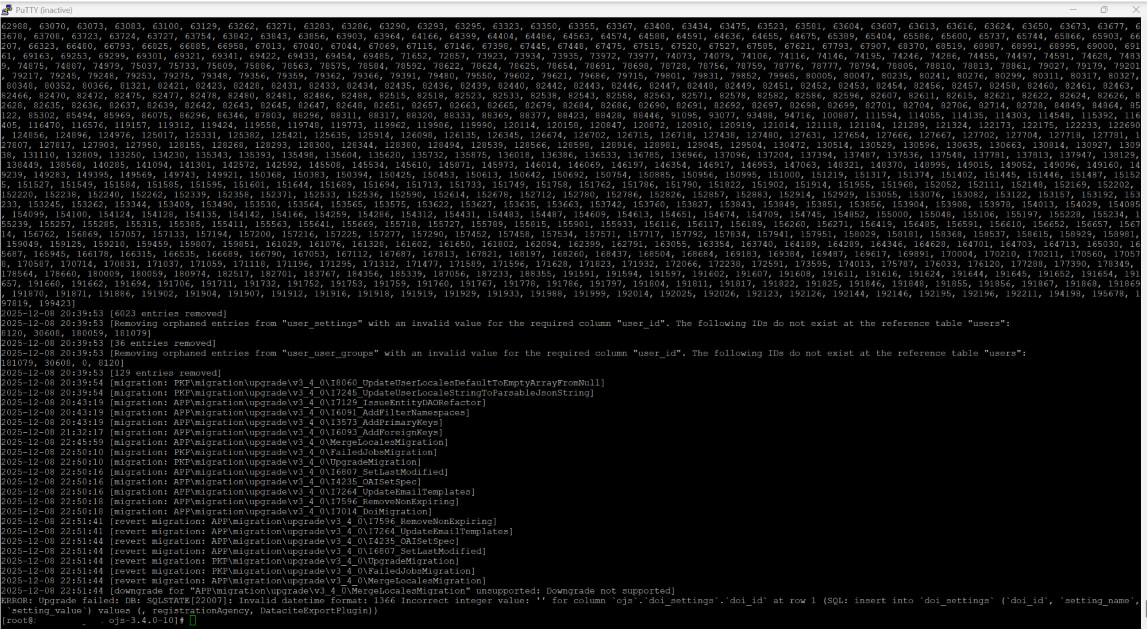
The screenshot shows an issue with an upgrade scripts not the twitterPlugin. But they need to be resolved for the upgrade to succeed. The suspicuous part is right after the DOI migration, the upgrade script tries to revert and fails because not all migrations can be reverted. At the very end there’s also a complaint about an invalid value in the doi table. First - to retry you will need to reset the database to a known good one, it may be also necessary to restore the file folders contents. It might be worth checking if you have the latest variant of OJS 3.4 before retrying (php tools/upgrade.php check will give that info). As it complains about the doi settings can not be rewritten - I’d first suggest to disable all the doi registration options in the old version and the retry the update.

The twitterBlock thingy might resolve itself. But if not - do you have any tool at hand to inspect the database directly?

I use DataGrip. What do you need to see I can share. Thanks @cager. I can write sql and modify code if you can point me or give directions. Now I am reloading and retrying.

If it still causes you issues - unfortunately I don’t have a concrete suggestion what you need to do in the database, but the screenshot of the errors mentions you have lots of orphaned entries. Then later it complains about a missing id for dois. you can have a look at the doi table (sorry, I don’t recall what it’s called for ojs 3.3, but should be identifiable) and see what entry it is that causes you trouble. chances are it is also orphaned then you can delete it.

In my case I had the follwing issue when I migrate my OJS from 3.3.0-16 to 3.4:

ERROR: Upgrade failed: DB: SQLSTATE[42S01]: Base table or view
already exists: 1050 Table ‘dois’ already exists (SQL: create
table dois (doi_id bigint not null auto
_increment primary key, context_id bigint not null, doi
varchar(255) not null, status smallint not null default ‘1’)
default character set utf8 collate ‘utf8_gene
ral_ci’)

Any Suggestion ? Thank you