hello,
I’m having a problem with the WebFeed plugin. OJS 3.3.0.18.
The files are correctly on FTP (screen 1) but the plugin doesn’t appear in the list (screen 2)…
Any ideas?
Thank you
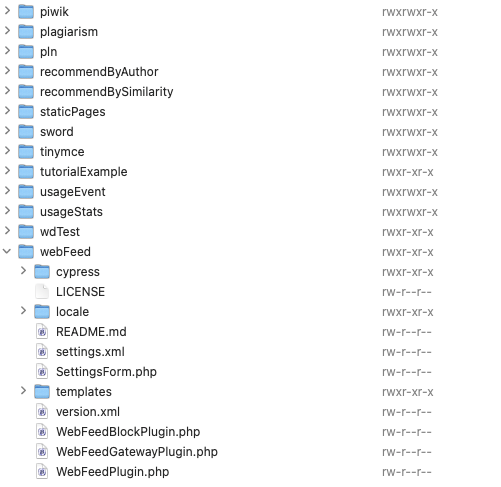

Hi @grafica,
Is there a reason that you didn’t install it from the plugin gallery (this is the recommended way, as other methods carry a certain degree of risk. What version of the WebFeed plugin are you trying to install? It could possibly be incompatible with that version of OJS.
-Roger
PKP Team
@rcgillis - This plugin comes with a standard OJS installation, not with the plugin gallery.
https://github.com/pkp/webFeed/blob/ebed779fff0bc97dca563ed70c761c32445fcf81/README.md
hi @rcgillis ,
ojs is 3.3.0.18
webfeed is 1.0.0.0
I’m not an expert. The plugin was already on FTP when we updated ojs, but not in the list.
So I tried to add it manually (with FTP), but it still not appears on the list 
exactly, but it never appeared in the list to activate it
Not sure if that helps. If you have access to the shell, you might try
cd {ojs_root}/lib/pkp/tools
php ./installPluginVersion.php {ojs_root}/plugins/generic/webFeed/version.xml
Supply your OJS root directory for {ojs_root}.
The culprit may be the wdTest plugin before - what should that be for?
@mpbraendle THANK YOU so much! now the plugin works.
the problem was the ‘wdTest’ folder, it seems like an incomplete test or something similar