Version Mismatch in Admin Dashboard and Missing Plugins after Upgrading OJS to 3.5.0.3

Describe the issue or problem
I recently upgraded my OJS installation from version 3.4.0.8 to 3.5.0.3. While the upgrade seemed successful in some areas, I am facing two major issues:

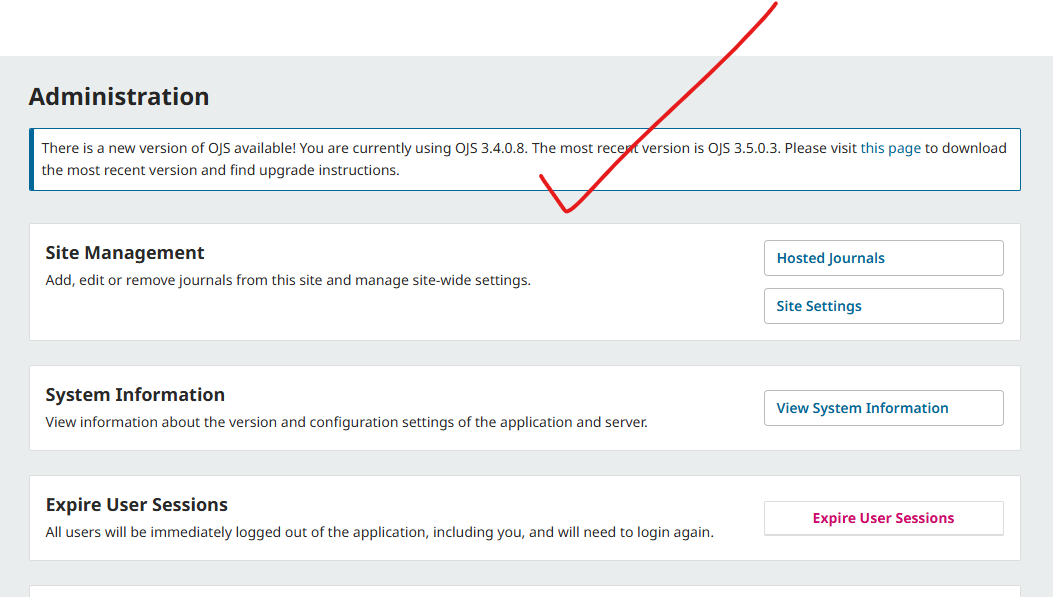
1. Version Mismatch in Dashboard: Even though the journal dashboard shows the new interface and updated features, the Administration page still displays a notification saying: “You are currently using OJS 3.4.0.8. The most recent version is OJS 3.5.0.3.” It seems like the system hasn’t fully recognized the update in the database or the admin panel.

2. Plugin Issues (Missing and Not Installing): I am also having trouble with plugins. Specifically:

  • After upgrading a plugin from the Plugin Gallery, it does not appear in the Installed Plugins list.

  • Many plugins that I used in my previous version (3.4.0.8) have disappeared from the installed list entirely.

  • The Status column in the Plugin Gallery shows “Up to date” or “Can be upgraded,” but the plugins remain inaccessible in the management tab.

I have attached screenshots of my Administration page and Plugin settings for better understanding.

Steps I took leading up to the issue
For example:

  1. See error

What application are you using?
For example, OJS 3.5.0.3

Additional information
Please add any screenshots, logs or other information we can use to investigate this problem.

I do not get the problem where it thinks I haven’t installed 3.5.0.3 but I do get the same “plugin is version higher than” message when I try to update things like Shareif and keyword cloud, which it says have updates but the version installed is the same as the latest github release.

Hi @shahin,

If your OJS is still reporting version 3.4.0.8, then it’s likely that the upgrade to 3.5.0-x did not successfully complete. Did you receive an error message during the upgrade?

Regards,
Alec Smecher
Public Knowledge Project Team

Hello - On the missing plugins I had a similar problem as the original poster. The plugins would say “upgrade available” but when I tried to upgrade through the web interface it failed saying installed was newer. When I looked through /var/www/html/plugins/generic for example I did not see the plugins it thought were available to be upgraded. I installed them manually through git and changed owner to www-data and now it sees them again, is able to delete them again, and does not give an error about newer versions.

Hi Alec,

Thank you for your response.

Regarding the upgrade, I did encounter an error initially during the process related to a missing table. However, I addressed and fixed that issue, and the upgrade appeared to proceed after that.

Despite this, I am facing two specific problems:

  1. Version Reporting: The system is still reporting version 3.4.0.8 instead of 3.5.0-x.

  2. Plugin Issues: Even after successfully installing or upgrading plugins, they are not appearing in the “Installed Plugins” list.

It seems like the database hasn’t fully acknowledged the version jump or some schema updates are still pending. Could you guide me on how to ensure the version registry and plugin list are correctly updated?
I have faced the Same issue.

Dear Asmecher,

I have been stuck in a frustrating loop of database migration errors.

A database error has occurred: SQLSTATE[42S22]: Column not found: 1054 Unknown column ‘redirect’ in ‘site’ (Connection: mysql, SQL: alter table `site` modify `redirect` bigint null)

A database error has occurred: SQLSTATE[42S22]: Column not found: 1054 Unknown column ‘context’ in ‘notification_subscription_settings’ (Connection: mysql, SQL: alter table `notification_subscription_settings` rename column `context` to `context_id`)

A database error has occurred: SQLSTATE[42S21]: Column already exists: 1060 Duplicate column name ‘redirect_context_id’ (Connection: mysql, SQL: alter table `site` rename column `redirect` to `redirect_context_id`)

A database error has occurred: SQLSTATE[42S22]: Column not found: 1054 Unknown column ‘context’ in ‘notification_subscription_settings’ (Connection: mysql, SQL: alter table `notification_subscription_settings` rename column `context` to `context_id`)

Hi @shahin,

If an upgrade attempt fails, you’ll need to restore from backup and address the issue before trying again. You can be sure the upgrade succeeded when you get a message stating that.

It sounds like you may have continued in production with a half-upgraded installation, however – this can be tricky to fix. The first step is to figure out how far the installation was successfully upgraded. Do you have the error message you received from when your production installation failed the upgrade?

Regards,
Alec Smecher
Public Knowledge Project Team

I have faced those types of error in the time of my installation.

Hi Alec,

Here are the specific database errors I am encountering during the upgrade attempt:

  1. SQLSTATE[42S22]: Column not found: 1054 Unknown column 'redirect' in 'site' (SQL: alter table site modify redirect bigint null)

  2. SQLSTATE[42S21]: Column already exists: 1060 Duplicate column name 'redirect_context_id' (SQL: alter table site rename column redirect to redirect_context_id)

  3. SQLSTATE[42S22]: Column not found: 1054 Unknown column 'context' in 'notification_subscription_settings' (SQL: alter table notification_subscription_settings rename column context to context_id)

It seems like the upgrade script is confused because some schema changes were partially applied in my previous failed attempts.

One critical issue is that I do not have a working backup from before these upgrade attempts on my PC or server. It’s probably December 15, 2025.

Since I cannot restore to a clean state, how should I manually adjust these tables or the schema via phpMyAdmin to allow the upgrade to proceed correctly?

Hi @shahin,

If you don’t have the original error message you encountered during the first failed upgrade, then you won’t know how much of the upgrade completed successfully and which parts were not executed.

You’ll need to look over the upgrade process and compare it against your database in order to determine the point of failure. Have a look at this post for details:

You’ll want to find the latest step in the upgrade process that was successfully completed.

Regards,
Alec Smecher
Public Knowledge Project Team

Duplicate thread:

Closing this one.