Possible widespread cloaking attack affecting OJS sites (Googlebot-only gambling spam)

Hello PKP team and community,

I am currently investigating what appears to be a coordinated cloaking attack affecting Open Journal Systems installations, where gambling content (e.g., Slot88 / Slot Gacor / Agen Slot) is being delivered only when the User-Agent is Googlebot.

This results in Google indexing and displaying gambling metadata instead of legitimate journal metadata, severely impacting the reputation and visibility of academic journals.

The issue is not visible to regular users or when accessing through a standard browser. The pages load normally in all normal browsing conditions. However, if the User-Agent is set to Googlebot, the response changes.

The behavior can be reproduced with:

curl -A “Googlebot” https://revistas.usp.br/

This returns gambling content, while:

curl https://revistas.usp.br/

returns the legitimate journal site.

This strongly suggests server-side cloaking, not spam submissions or editorial-side manipulation, and not simply page cache or metadata corruption.
At this point, it does not appear to be database-level spoofing, and I do not currently see evidence pointing to template or plugin modification, which raises concern that the vector may be external or injecting at runtime.

I have confirmed that this behavior is affecting multiple academic institutions running OJS, not just my installation. For example:
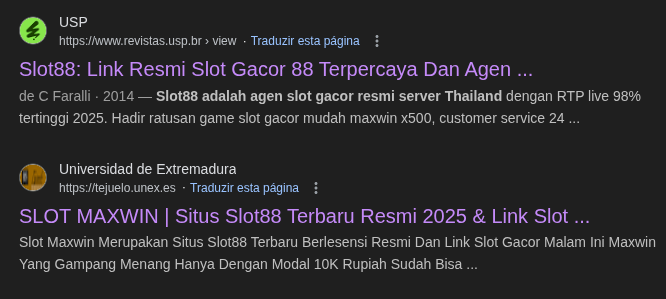
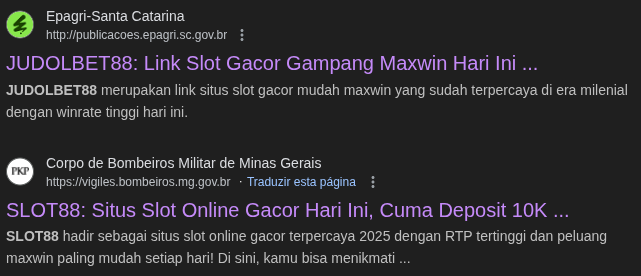
I also found a potentially related thread:
https://forum.pkp.sfu.ca/t/gambling-commercial-inside-php-library-used-by-ojs/97184/4

Why this is concerning

  • It appears to be a targeted attack on OJS infrastructure

  • It is Googlebot-only, so admins may not notice it

  • It causes SEO poisoning, blacklisting risk, and academic credibility damage

  • Multiple universities appear compromised in the same way

  • From early inspection, this seems like an external runtime injection / cloaking layer rather than editorial or database corruption

Request

Has the PKP team observed similar reports?
Are there any known vulnerabilities or guidance for detecting/removing cloaking payloads affecting OJS specifically?

I believe many administrators may be unaware because the site looks normal in browser tests — but Google is currently seeing an entirely different payload.

Regards,

Tarcisio Pereira

Hi @Tarcisio_Pereira,

This is probably caused by a local code modification. What version of OJS are you using? (Please include this with your posts.)

Regards,
Alec Smecher
Public Knowledge Project Team

Hi @asmecher

Sorry about that, I’m using version 3.4.0.4

Thanks for the follow-up.

In my case it is very unlikely to be caused by local code modifications.
I make a point of keeping the OJS installation as close to the upstream distribution as possible, and I avoid custom changes to core files, templates, or plugins. We also do not run third-party SEO plugins or custom theme logic that could introduce cloaking behavior.

And multiple academic OJS installations are showing the same behavior.

Regards,

Tarcisio Pereira

Hi @Tarcisio_Pereira,

OJS 3.4.0-4 is several releases behind, and it’s likely that there are known and already-fixed issues in it (e.g. stored XSS problems) that may have been used to gain access to the installation and make changes. Make sure you keep up to date with the latest release in any of the supported branches (currently 3.3.0-x, 3.4.0-x, and 3.5.0-x). See this recent memo.

I still think local modifications are the likeliest cause. In particular, check to make sure that there are no unexpected plugins in plugins/generic. If that doesn’t turn anything up, use a tool like diff to compare your installation’s contents to a fresh download of the same version.

Regards,
Alec Smecher
Public Knowledge Project Team

Hi @asmecher

I just wanted to follow up and say thank you for pointing out that the issue was likely due to local code modification. You were absolutely right.

After further investigation, I found that the attack had modified core bootstrap files, which explained why the cloaking behavior only appeared for the Googlebot user agent and why everything looked normal from the browser.

For the sake of anyone else who may run into the same issue, here are the files that were altered in my case:

  • OJS: lib/pkp/includes/bootstrap.php

  • WordPress (same server): wp-blog-header.php

Both files had malicious logic inserted early in the execution flow, performing user-agent checks and redirecting Googlebot traffic to gambling spam content.

Replacing those files with clean versions from the official distributions immediately resolved the issue.

If you’re seeing Google-only cloaking or gambling content indexed by Google while your site appears clean in the browser, I highly recommend checking these files — as well as other early-execution entry points on the server.

Just to provide more detail for anyone else investigating something similar — besides the modified bootstrap files and the injected shell (Alfa Team SSI Shell) inside the custom plugin, I also found an unexpected .shtml file dropped by the attacker.

Regards,

Tarcisio Pereira

2 Likes

Hi @Tarcisio_Pereira,

Thanks for the follow up, and glad you found the issue. Make sure you try to identify the source of the break-in rather than just removing the effect – otherwise you may find yourself in the same situation again. The likeliest causes are

  • an out of date OJS,
  • a files_dir that’s somewhere web-accessible,
  • an easily guessed manager or admin password

Regards,
Alec Smecher
Public Knowledge Project Team

2 Likes

Hello everyone,

Thank you @Tarcisio_Pereira for raising this critical issue, and @asmecher for the analysis.

I completely agree that for an existing infection like this, an external diff is the most important and reliable first diagnostic step to identify the compromised or injected files. Cleaning those files and immediately upgrading OJS to the latest version is the top priority to close the initial vulnerability.

This discussion highlights how crucial it is for us to have proactive security layers, not just reactive ones. Once a site is clean, we need tools to monitor and harden it.

To help the OJS community with this challenge, I have developed two free security plugins:

1. File Integrity Scanner Seeing this exact problem, this tool was designed for early detection. After your site is clean, you can install this plugin.

  • Daily Scans: It automatically scans your OJS core and plugin files every 24 hours.

  • Cryptographic Hash Comparison: It compares the file hashes in your installation against the official hashes from the PKP repository.

  • Instant Email Alerts: If any file is Modified, Added (e.g., a backdoor), or Deleted, you, as the site administrator, will immediately receive an email alert.

This effectively automates the diff process for daily monitoring, giving you an instant warning of any suspicious activity. Link: https://github.com/ashvisualtheme/file-integrity-scanner

2. Security Headers Plugin Security headers won’t prevent a server-side attack like this one. However, they are essential for protecting your site from other attack vectors (client-side) like XSS, clickjacking, and MIME-sniffing, which are often used to steal admin credentials in the first place.

This plugin makes it easy to implement modern security headers (like CSP, HSTS, X-Frame-Options) directly from your OJS dashboard. Link: https://github.com/ashvisualtheme/security-headers-plugin

Using the File Integrity Scanner to monitor your files and the Security Headers Plugin to harden the user’s browser will significantly improve your OJS installation’s security posture against future threats.

We hope these tools are useful to the community. We are very open to feedback and bug reports.