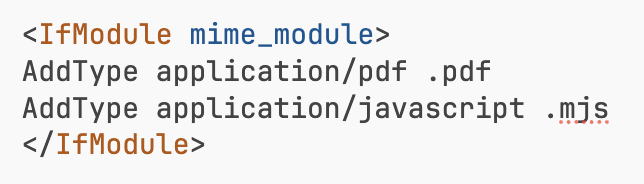
I recently updated to OJS 3.5 and PDF viewer stopped working. I can download PDFs but viewer is not working. I already tried to reinstall pdfJsViewer, adding MIME type application/javascript with an mjs extension, modifying the .htaccess file with Add Type codes, and nothing seems to work. I already double checked the config.inc.php file configuration for allowed hosts, files path and base url. I don’t know what else to do. Please help.


Hi @Ana,
See e.g.: Articles not opening in browser - #8 by asmecher
Regards,
Alec Smecher
Public Knowledge Project Team

Hi @Ana,
This is a web server configuration issue, and will depend on your host’s support e.g. for .htaccess files – I can’t give much guidance here. But to narrow the problem down, send your browser to the .mjs file directly, e.g.:
http://[your host]/path/to/ojs/plugins/generic/pdfJsViewer/pdf.js/build/pdf.mjs
You should see some source code like this:

Then, open the web developer tools and go to the Network tab:

(You might need to reload to get the information to show.)
You’ll note that on my screenshot the “Type” column shows js for pdf.mjs. That’s what it should be.
Yours will probably show something incorrect, like text/plain. You’ll need to configure your server to correctly identify these as Javascript files.
Regards,
Alec Smecher
Public Knowledge Project Team


A stupid idea is that the browser serves you the cached version of pdf.mjs with the wrong mime type even after you reconfigured the server (provided that everything’s configured right). This would explain the different results in different browsers. Have you tried clearing the cache or, e.g., incognito mode?
Hi all,
 That’s not a stupid idea at all!
Regards,
Alec Smecher
Public Knowledge Project Team
I think that was the problem.
Thank you