We have set the order in one of our series to be series number - highest first. Vols. 01 to 10 are in the correct order below the “New Releases” section. The two titles in the New Releases section, 09 and 10, are not marked as new in the Catalogue. Vols. 11 and 12 are listed below Vol. 01. And 12 is marked as new but still does not appear under new titles. I don’t even know where this “New Releases” section is activated? Our other series do not have a “New Releases section”. And then there are two places to select the order. It can be done in both Series and in Category. Needless to say the editors are not too happy with this as the most recent books are at the bottom of the page. and the New Releases are not new.
Hi @geirrosset,
What version are you running (e.g. 3.4.0-5 - please indicate this in your posts, in the future).
-Roger
PKP Team
Of course. Forgot. 3.4.0.3
Found an issue, not sure it has anything to do with the ordering problem, but can’t figure out how to fix it. The titles in question, back issues of the series, all show as “Forthcoming” even though they are published and the date, back in time, is set correctly. I have tried re-entering the date, but they still show as forthcoming. Only the last two in the series (13 and 14), published today, show as “Published”. Look here: https://omp.novus.no/index.php/novus/catalog/series/nordisksamtidspoesi
So not a single suggestion on what can be done about this problem or what the cause is for any of this?
Hi @geirrosset, for the “Forthcoming” labels issue, you may be encountering this bug which is fixed as of 3.4.0-8: OMP wrongly displays "Forthcoming" message if the date format is changed · Issue #10169 · pkp/pkp-lib · GitHub
I would strongly recommend upgrading if you can to the latest 3.4 release, but if you are not able to upgrade you could apply the changes as a patch to your installation and see if it resolves that for you: https://patch-diff.githubusercontent.com/raw/pkp/omp/pull/1729.patch
For the new releases, assuming you want to disable that section all together, can you check if it’s enabled in Settings > Website > Appearance > Setup, then under “New Releases”?
Yes it is enabled, but that is for the Home Page. This is on the series page. Even if I turn it off for the home page this one series still displays a “New releases” section at the top, and the two titles there are not even the two newest releases, which are listed at the bottom of the page. All our other series list the titles from newest to oldest and side by side. This one problematic series has a “New releases” section at the top with two titles (don’t know where that section comes from), then lists vols. 10 to 1, one below the other, and then 14-11 side by side at the bottom (with 14 and 13 being the two newest releases). It is just a mess.
Hi @geirrosset, it took a little digging but I figured out how the series new releases are set.
Try going to the Catalog section in the dashboard, then click “Filters”, and click the series you are having the issue with to filter by that series. You should now see new checkboxes for “Featured in series” and “New release in series” that you can disable.
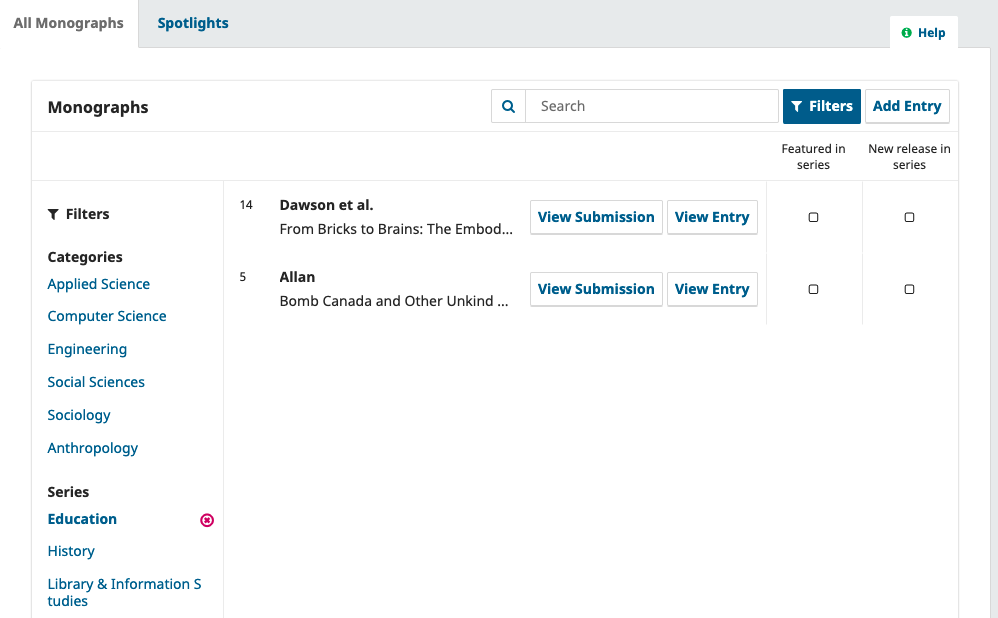
Yes that was it! Thank you. Not a very intuitive place to have the settings for the series if you ask me. This should have been accessible through the series settings.