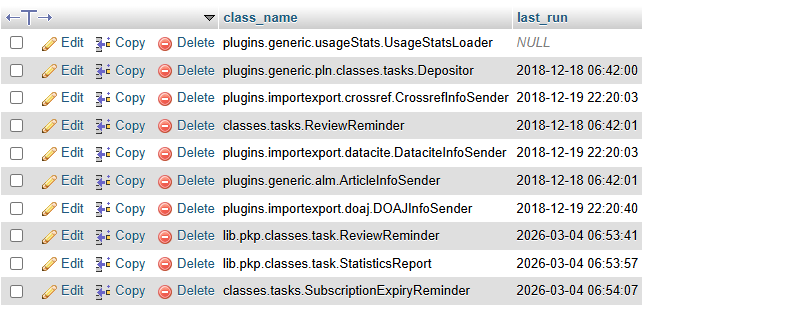
After the upgrade from 2.4.6.0>>3.1.1.4, we are facing an issue with article metrics. The metrics data available in version 2.4.6.0 is still visible; however, metrics for the upgraded versions are not being counted or updated. For all published articles, the system is showing 0 article views and 0 PDF downloads.
Observations:
In OJS 2.4.6.0, metrics are shown as ojs::legacycounterplugin.
After upgradation some metrics shows ojs::counter, but the counts are still not increasing.
This issue affects all published articles.
We kindly request you to review this issue and suggest the possible cause and resolution for why the metrics are not updating after the upgrade.
Note: The OJS instance was upgraded from 2.4.6.0>>3.1.1.4 in 2018. The last metrics were recorded in the database at the time of that upgrade. After the subsequent upgrades, the metrics have not been counted or recorded.
Before 2.4.3, I believe – it was so long time ago – there were different ways how usage statistics were calculated. One way would save the metrics as ojs::legacyCounterPlugin. From 2.4.3 until 3.4, there was only one way, UsageStatsPlugin, that considers/uses metric type ojs::counter. The old way that used ojs::legacyCounterPlugin had been removed, and the journal could only create the reports for those old data. At some point the ojs::legacyCounterPlugin entries are removed from the DB.
If you do not have correct data for ojs::counter metric type, you should double check if your UsageStatsPlugin is enabled and setup correctly, if the usage is correctly logged in the file system, and if the usage stats log file processing is happening correctly.
Further information about all that you can find in the forum. Once you investigated it all, let me know if you would need any further help.
Thank you for your reply. We have double-checked that the UsageStatsPlugin is enabled; however, the usage logs are not being created under files/usageStats/archive. Additionally, in the database table scheduled_tasks, the entry plugins.generic.usageStats.UsageStatsLoader shows NULL.
In the directory files/usageStats/, there are two folders: archive/ and usageEventLogs/.
The archive/ folder is currently empty and does not contain any files or subdirectories.
The usageEventLogs/ folder contains log files, for example usage_events_20260311.log.
Do you use Acon plugin to run the scheduled task?
If so, could you maybe try to reload scheduled tasks: as Admin or Journal Manager go to the Website Settings > Plugins > Installed Plugins > Generic Plugins > Acron Plugin > click on the arrow to expand > click on “Reload Scheduled Tasks”.
Do you now see something in the last_run column for the UsageStatsLoader entry in the DB table scheduled tasks?