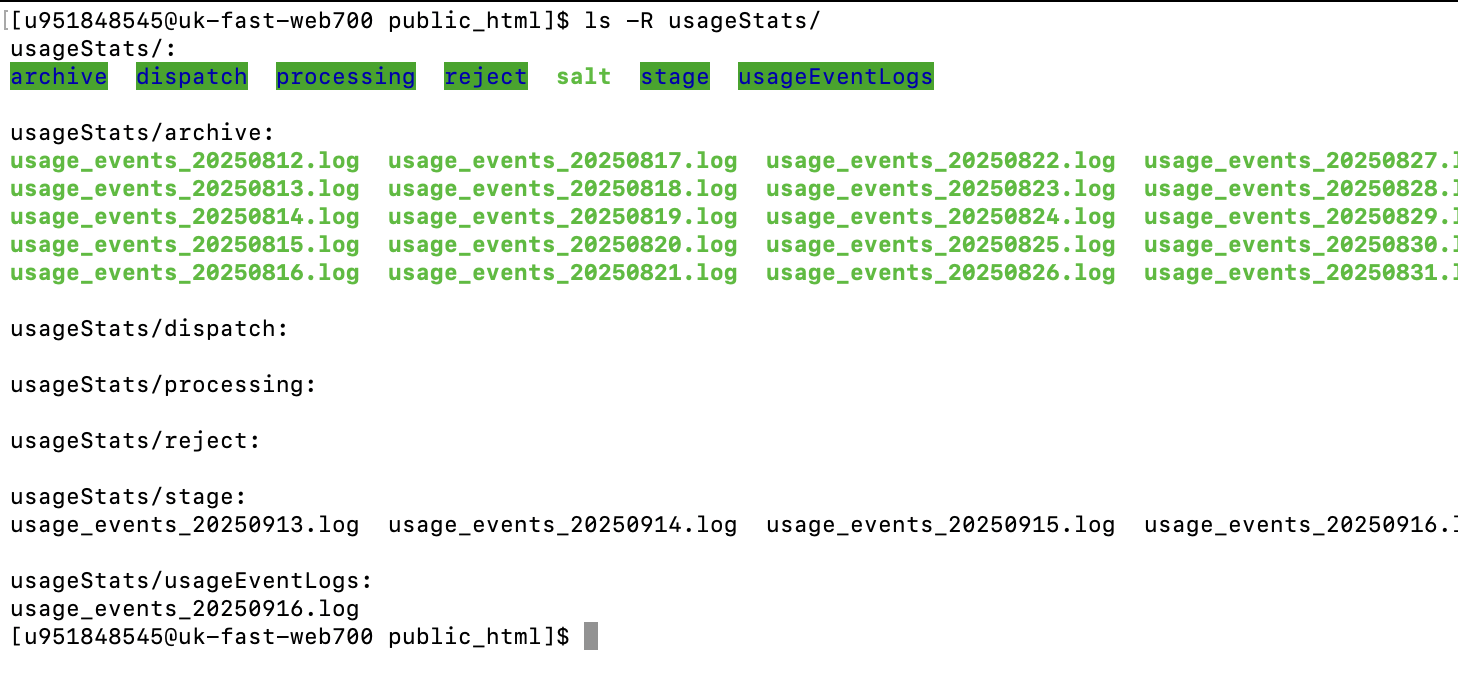
```usageStats/
├── archive/          # Logs that have been processed
├── dispatch/         # Jobs waiting to be dispatched
├── processing/       # Logs currently being processed
├── reject/           # Logs failed to process
├── stage/            # Logs waiting to be picked up by job
├── usageEventLogs/   # Processed logs stored in database-friendly format
└── salt              # File containing unique salt for usage stats
```
Hi , we do not have any queue named usageStats when dispatching job , the default queue named as queue unless any custom modification done in the codebase manually or updated the default queue in the config. so pushing jobs in a custom queue named usageStats will not be picked by job runner or worker without custom modification or passing queue name as worker param . Also the configuration of job_runner should be On or Off instead of 1 or 0 . both are same but in few places we have some strict checking so better to follow the right convention .
Also with the default configuration, does the usage stats jobs not executing ? can you clarify that ?
I am experiencing an issue with OJS 3.5 where article and issue statistics are not working. I have verified the following:
All jobs (php jobs.php statistics:process / scheduled tasks / cron) are running correctly.
File permissions on the server are properly set.
No related errors appear in the server logs.
Despite this, the statistics data is not being recorded in the database and does not appear on the dashboard. Could you please advise on how to resolve this issue?
Are your usage stats log files correctly created and the usage written into the log files? What happens with them, in which folder are they?
Do you see that the scheduled task UsageStatsLoader is executed and its log file exist for every day in your filesFolder/scheduledTaskLogs/ ?
How do you see that the jobs are running correctly? Also the usage stats jobs?
Every day UsageStatsLoader scheduled task is run. UsageStatsLoader considers log files in the folder usageEventLogs and stage. Thereby the files from usageEventLogs are first copied to the stage folder. It then dispatches lots of jobs in a chain (that should be executed one after another, in a specific order) for all the log files there.
Note: The log files and folders need to have correct access permissions. When using the build-in runner, the web user needs read and write access to the log files and folders.
Once the job chain is dispatched, the files are moved to the folder dispatch. They stay there until they are not processed by the jobs. When a file is fully processed by the jobs, and statistics calculated and saved in their DB tables, it is moved to the folder archive.
The scheduled tasks have their log files under files_folder/scheduledTaskLogs/. There one can also see the log files for UsageStatsLoader scheduled task. If an error occurs when that task is run, one will find it in that log file. So, it is good to control the scheduled task running there.
When the built-in job runner is used, the jobs on the queue are run on a user request, when a user requests the web page/site.
These are the statistics jobs, that exist only in a chain:
First the job ProcessUsageStatsLogFile is run, that reads a log file and saves the entries in temporary DB tables.
The job RemoveDoubleClicks is then run on those temporary DB tables, to remove the double clicks – all the accesses of one and the same URL withing 30 seconds by the same user will be reduced to 1.
The job CompileUniqueInvestigations consideres unique accesses – all the accesses of one submission within an hour by the same user will be counted as 1 unique investigation.
The job CompileUniqueRequests consideres unique file downlaods – all the downloads for one submission within an hour by the same user will be counted as 1 unique request.
The job CompileContextMetrics then calculates daily statistics for the journal index page.
The job CompileIssueMetrics calculates daily statistics for issues.
The job CompileSubmissionMetrics calculates daily statistics for submissions.
The job CompileSubmissionGeoDailyMetrics calculates daily Geo statistics for submissions.
The job CompileCounterSubmissionDailyMetrics calculates the COUNTER R5 daily metrics for submissions.
The job CompileCounterSubmissionInstitutionDailyMetrics calculates the COUNTER R5 daily metrics for submissions and institutions.
The job DeleteUsageStatsTemporaryRecords deletes the entries in the temporary tables – because all the statistics for that day should be calculated at that moment.
The job ArchiveUsageStatsLogFile moves the processed log file into the archive folder.
The job CompileMonthlyMetrics calculates the monthly Geo statistics, COUNTER R5 submissions and COUNTER R5 submissions+institutional statistics.
As admin the jobs can be seen under “Administration”. Or in the DB table jobs. If a job fails, they can be seen under “Administration” or in the DB table failed_jobs. There, also the reason why the job failed can be found there.
In OJS 3.5, the UsageStatsLoader scheduled task log file should contain something like: 2025-12-17 16:15:43] ``http://ojs-domain [2025-12-17 16:15:43] [Notice] Task process started. [2025-12-17 16:15:43] [Notice] File /path/to/files/folder/usageStats/processing/usage_events_20251211.log was moved to dispatch folder. [2025-12-17 16:15:43] [Notice] File /path/to/files/folder/usageStats/processing/usage_events_20251216.log was moved to dispatch folder. [2025-12-17 16:15:43] [Notice] The background jobs that will process the log files and store the statistics data have been dispatched. [2025-12-17 16:15:43] [Notice] Task process stopped.
Is this what you have as well? I.e. are there entries that the log file was moved to dispatch folder?
thanks for replying, yes i have 3.5.0.2.
my scheduled task log file are like this [2025-12-17 17:45:39] http://ojs-domain [2025-12-17 17:45:39] [Notice] Task process started. [2025-12-17 17:45:39] [Notice] Task process stopped.
the entries are stuck in /usageEventLogs/
archive | dispatch | processing | stage reject folders were not present, i made it. php lib/pkp/tools/jobs.php run -v
shows
[INFO] No jobs available to run in the queue named queue.
php lib/pkp/tools/scheduler.php run -v works but nothing shows
ive upgraded from 3.5.0.1, but the statistics were not funcioning either
i have a custom folder for my public files, but it’s properly setup in my config.inc.php. Can this have an impact on the normal work of the code?
So did it all work with that reprocessing tool?
It does actually almost the same as the daily stats processing, so I really do not understand why would one process work and the other not.
I also do not understand why your scheduled task log file looks like that – it seems like there is some problem with getting the log file from the folder and moving it into other folders…