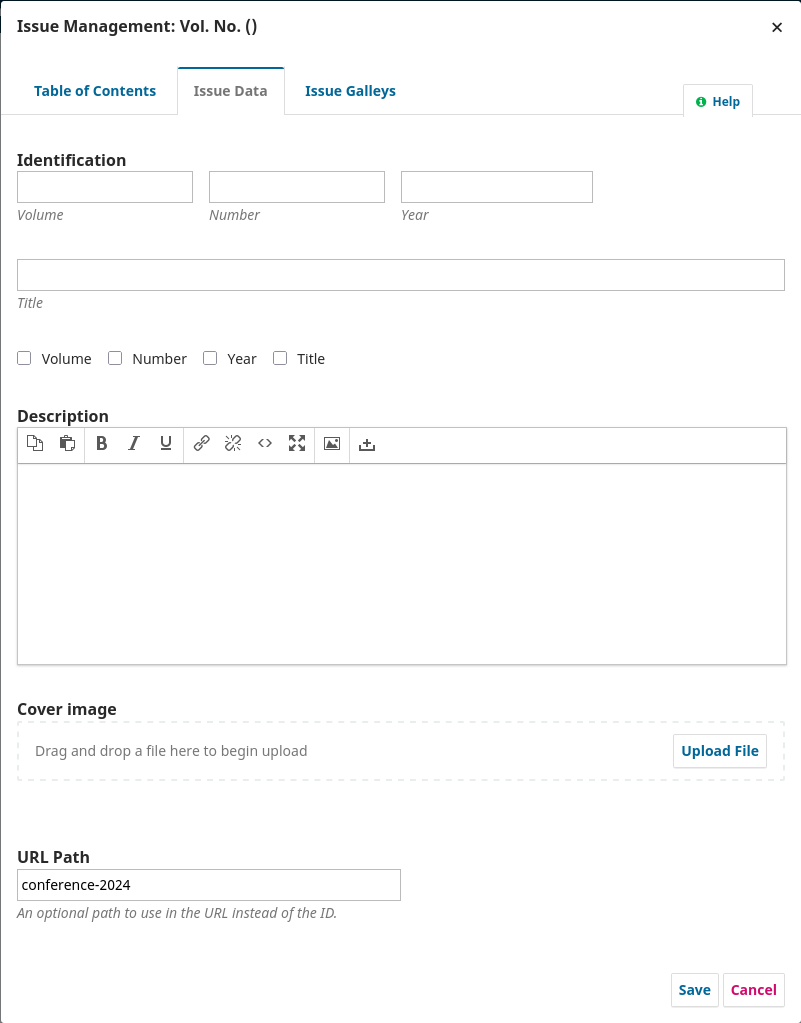
I’m trying to import an issue via the Native XML plugin. The XML file below imported successfully, but unfortunately added an empty issue without any metadata except the url_path and contained no articles (screenshots below).
Could anyone please help me understand what may be wrong with the XML file? I’m running OJS 3.3.0.8.
Related question. Is it possible to specify the cover image of an issue by its address rather than a byte64 encoded image?
Just thought I’d post an update here after some troubleshooting I performed since posting the last message, comparing the XML file I was trying to import with that of a dummy issue and article I exported from OJS. I’ve finally gotten the import to work, but a few sticky points remain:
I’m unable to specify an image in my shared hosting directory (/home/user/proceedings/conference_2024/banner.jpg) as my issue cover image in the cover element. It only seems to work if I base64 encode it.
I’m unable to specify a PDF file in my shared hosting directory (/home/user/proceedings/conference_2024/file.pdf) in the article_galley or submission_file elements. It also only seems to work if I base64 encode it in the submission_file element.
The big picture summary of what I’m trying to achieve is as follows. I already host an OJS instance in a shared hosting environment to manage the academic journal of our professional society. For the last few years, I’ve been hosting the proceedings of our society’s annual conferences on a DSpace instance hosted on Amazon Lightsail. Nevertheless, maintaining the DSpace instance is beginning to feel a bit daunting, and it feels a bit overkill for our needs. So I’m now looking to just host the conference proceedings as a separate “journal” on the OJS instance we already host. The only problem is that these papers just need to be uploaded as PDF files bypassing the entire review workflow. This is what led me to the Native XML import plugin.
So I basically need to upload 7 issues with 50-100 PDF papers per issue to the new OJS “journal” with as little friction as possible. Base64 encoding all the PDF files would make the size of the XML file for each issue to be too large to upload, and I’d really prefer a way to first copy the PDF files to the shared hosting environment and then just link them to each article in the uploaded XML file. Problem is, I’m unable to specify the location of these PDF files (or banner image per issue) in the XML file (see commented lines in the XML file below that currently don’t work). Any assistance would be much appreciated.
Any advice on whether OJS is even suited for this type of application would also be very welcome. I noticed, for instance, that deleting articles to correct errors once uploaded is far too tedious. I can’t even begin to imagine the horror of having to manually decline and delete around 100 papers one-by-one if I find some error in them after uploading an entire issue. Does anyone have any pointers or tricks to make it easier to use OJS as just a paper hosting platform in this way?
I’m unable to specify an image in my shared hosting directory (/home/user/proceedings/conference_2024/banner.jpg) as my issue cover image in the cover element. It only seems to work if I base64 encode it.
I’m unable to specify a PDF file in my shared hosting directory (/home/user/proceedings/conference_2024/file.jpg) in the article_galley or submission_file elements. It also only seems to work if I base64 encode it in the submission_file element.
For the image Files and PDF files, are you certain that this directory is readable? What are the permissions set to? Have the files imported in successfully along with the metadata in your initial tries?
Any advice on whether OJS is even suited for this type of application would also be very welcome.
From what I’ve seen, there are a number of journals that use OJS in this manner. Back issues imports tend to be something that you have to go through with established journals, but once you get up and running, the process tends to be much smoother. Once you get these issues imported - how many issues would this publication have per year ?
Troubleshooting just the PDF file for now, here’s what I’ve done:
I’ve set the permissions on the proceedings and conference_2024 directories, as well as the file.pdf file as 777.
In the article_galley element, I commented out the submission_file_ref element and uncommented the remote element.
I also commented out the submission_file element.
This resulted in a successful XML upload, but when I click the PDF link on the article, it gives me a 404 error.
I then commented out the remote element and uncommented the submission_file_ref element in the article_galley element.
I also uncommented the submission_file element.
Inside the submission_file element, I commented out the embed element and uncommented the href element.
This results in an unsuccessful XML upload, wherein it doesn’t give me any errors, but shows me a blank white box without any “successfully uploaded” message. It also creates a blank issue with no metadata and no articles are created. Same result as what I reported in my first message of this post.
Any thoughts? To answer your question, in my initial tries, the PDF file imported successfully only when encoded as base64, never when linked to a file within our shared hosting environment. It, however, worked when linked to an external PDF file as http://…on another website. Maybe my syntax/path for linking a file within the shared hosting environment is incorrect?
Also, with regard to using OJS to host conference proceedings, after uploading about 7 years worth of proceedings from past conferences, we intend to upload each future year’s conference proceedings to the site in a similar manner, likely using Native XML upload. Each set of proceedings would constitute around 50-100 papers.
Creating the Native XML file is not an issue since I’ve already written an Python script to convert our Excel spreadsheet into an XML file. The only problem I anticipate is making some kind of error (like missing or incorrectly entering some metadata), which will require me to manually delete each of the 50-100 uploaded articles. At the moment, here are the steps I’m following to delete one uploaded article:
Go to the Archives tab and click on the “View” button of uploaded article
Click on the “Assign” participants button, choose my name, and click OK
Go to the Submissions tab, click on “Change decision”, and then the “Decline Submission” button
Choose “Do not send an email notification” and then click the “Record Editorial Decision” button
Navigate back to the Submissions pane and open the Archives tab
Click on the down arrow next to the uploaded article, click on the “Delete” button, and then confirm “Yes” in the popup window.
It is quite exhausting and I can’t even imagine losing an entire day doing this one-by-one for an entire issue of 50-100 articles. Would you know of an easier way to do this? If not, please accept my humble suggestion to include one in a future release. I can see the risk of such a feature being incorrectly used, but having a well-concealed option with sufficient warning (maybe even as an optional plugin) would be very handy indeed.
You may already be aware, but ust a heads up that 777 permissions are not recommended for security reasons. At the very least, change it back to something more secure when you’ve completed the import process.
This is worth trying. if you might have some luck setting up pointing to a direct web-accessible path on your server (e.g. https://website.com/conference_2024/article1.pdf and doing it as an absolute path rather than a relative path. Relatedly - are the galleys showing up elsewhere as part of the submission within the main OJS install (e.g. as a galley within the submission)?
I could imagine. This isn’t the typical workflow for most using OJS, as a lot of the submissions originate within the submission workflow. The XML import provides some utility to import in buik, but undoubtedly it’s meticulous work. When I’ve worked with it in the past, I’ve done a thorough review of the XML file, making corrections where needed, and double-checking everything. I’m not sure there’s an easy solution here, if you miss metadata or make a mistake, I suppose you could make it a point to delete the issue, make the correction in the XML file, and then reimport it, but if it’s just for one or two of them, you may just want to make the corrections to the individual articles’ metadata, etc..
If you’d like to make a feature request - I’d suggest doing that as a separate post, in the Feature request category here on the forum.
Yup, thanks for the headsup. Changed the permissions back from 777 after the brief test.
I tried to copy file.pdf to /home/user/public_html/ojs/public/journals/2/conference_2024 and used <remote src="https://proceedings.nzsee.org.nz/public/journals/2/conference_2024/file.pdf"/> in my XML file. This seems to work just fine. Not really sure if this is an issue, but it doesn’t look like OJS is actually “importing” the file from that location and storing it in files_dir. For instance, when I rename file.pdf, I get a 404 error when trying to download that file from the front end website. I think this is probably not ideal for our purposes, so I might stop exploring this option further. Would you have any further advice on how we might be able to upload these proceedings without having to base64-encode all our PDF files?
Considering OJS is not “importing” the file, you’re right, it doesn’t really show up as a galley within the submission.
Are you importing via OJS UI or command line? I’d strongly recommend to use command line tools for that.
I think your issue importing files via URL do not work in the OJS UI import, only in the command line. This is for security reasons. I couldn’t find a link about this, but I’m pretty sure.
You mentioned using 3.3.0.8. I’d strongly recommend that you first upgrade to 3.3.0-22 for security reasons and then Native XML reasons. Around 3.3.0-17 Native XML got some serious bug fixes.
Your approach in exporting stuff to then create XML files is a good idea, but please upgrade your install first to grab a fresh export of XML.
About your worries on importing and then needing to delete something, I’d recommend to have another instance of your OJS to test the import first. And I’d setup a workflow like this (better if done with scripts):
database dump and files backup
try importing
if it fails you can restore DB and files to do another try
Native XML is very tricky to get right. The link below has some examples of that.
We use a shared hosting environment, to which we do not have command line access. So we’re unfortunately constrained to using the web interface.
Thanks for that note. We’re currently in the process of upgrading to v3.5.0.3, so maybe I’ll just wait until that’s done to import the conference proceedings.
That makes a lot of sense. Only problem being we’re looking to transition from a DSpace instance we’re currently using to host our conference proceedings to the OJS instance we already use to manage our journal, due to the additional work involved in maintaining that DSpace instance. But having to jump through all of these hoops to import the conference proceedings into OJS each year seems like it might actually not result in a significant saving of time and effort. So maybe it makes more sense to continue using the DSpace instance for the conference proceedings. Would really appreciate your thoughts/advice on this.
@rcgillis - I put up a feature request as you suggested and was pointed to the tools/deleteSubmissions.php script in one of the comments to it. On first look, it would appear that this could be the solution to my problem, if I’m somehow able to run this PHP script on a shared hosting environment. Would you happen to know if it’s possible to do this?
I suspect that might be the kind of thing that you would want to communicate with your systems administrator of the hosting environment and guage their comfort level with running the CLI tools. I think that the risk would be quite low that it would impact anything else in your shared environment, but that could depend on how the environment is setup. At the very least, if you are (presumably) working from a Virtual machine - doing a backup of the virtual machine would be essential.
Thanks Roger. Our access to the shared hosting environment is limited to cPanel, and no command line tools are available there to the best of my knowledge. Nevertheless, will get in touch with the admins to confirm anyway. Cheers!