iThenticate Configuration on OJS 3.5.0.3

Describe the issue or problem
iThenticate has been installed but the interface to enter credential is missing

Steps I took leading up to the issue

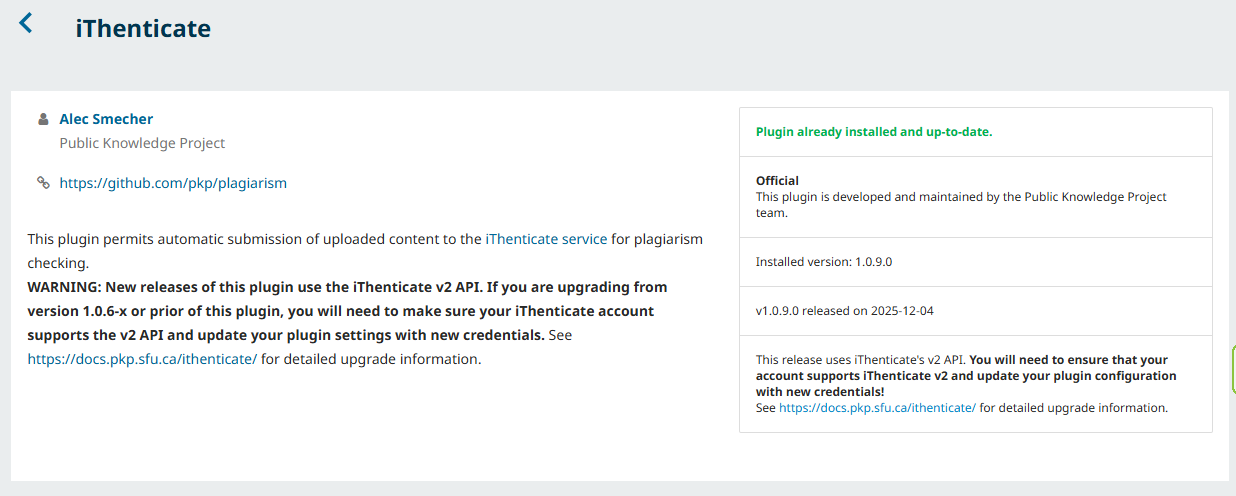
  1. In Plugin Gallery.
  2. Search for the iThenticate Plagiarism Detector Plugin.
  3. The instruction says: Expand the menu and click Settings to update your credentials. There is no link to the setting nor a menu to expand for the update.

What application are you using?
For example, OJS 3.5.0-3

Additional information

Hi @TSoretire,

Hmm… on the instance I’m using. I’m not able to install this. Paging @asmecher here who’s worked more actively on the plugin and may be able to weigh in.

-Roger
PKP Team

Hi @TSoretire,

Are you looking for the Settings area while still inside the “Plugin Gallery” tab? Try going to the “Installed Plugins” tab.

Regards,
Alec Smecher
Public Knowledge Project Team

@rcgillis Thank you

@asmecher iThenticate is not listed under any of the Categories under the Installed Plugin tab.

The screenshot is from the Plugin Gallery.

Hi @TSoretire,

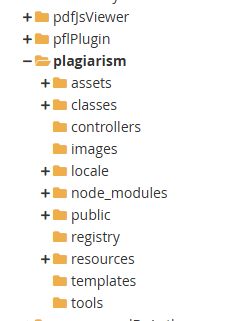
Does plugins/generic/plagiarism exist in your OJS installation directory?

Regards,
Alec Smecher
Public Knowledge Project Team

Hello @asmecher ,

Yes, the folder exists

Hi @TSoretire,

What do you see for the following SQL query?

select * from versions where product like '%lagiar%';

Regards,
Alec Smecher
Public Knowledge Project Team

@asmecher

Hi @TSoretire,

Hmm, that all looks correct to me… Can you double-check that there is nothing under the “Generic Plugins” category in the plugin list? It should look like this:

image

Regards,
Alec Smecher
Public Knowledge Project Team

@asmecher

It is missing. Below is a screenshot

Hi @TSoretire,

Can you check your PHP error log to see if anything relevant appears there?

Thanks,
Alec Smecher
Public Knowledge Project Team

@asmecher

I did not get an error with the string iThenticate or plagiarism. But I got this block with plugin appearing recurrently:

[23-Jan-2026 15:04:27 UTC] PHP Fatal error: Uncaught Error: Class “APP\plugins\generic\pflPlugin\PKPString” not found in /home8/cecrj/public_html/plugins/generic/pflPlugin/PflPlugin.php:539
Stack trace:
#0 [internal function]: APP\plugins\generic\pflPlugin\PflPlugin->APP\plugins\generic\pflPlugin{closure}()
#1 /home8/cecrj/public_html/plugins/generic/pflPlugin/PflPlugin.php(531): preg_replace_callback()
#2 /home8/cecrj/public_html/lib/pkp/lib/vendor/smarty/smarty/libs/sysplugins/smarty_internal_runtime_filterhandler.php(63): APP\plugins\generic\pflPlugin\PflPlugin->authorCiFilter()
#3 /home8/cecrj/public_html/lib/pkp/lib/vendor/smarty/smarty/libs/sysplugins/smarty_internal_template.php(232): Smarty_Internal_Runtime_FilterHandler->runFilter()
#4 /home8/cecrj/public_html/lib/pkp/lib/vendor/smarty/smarty/libs/sysplugins/smarty_internal_templatebase.php(238): Smarty_Internal_Template->render()
#5 /home8/cecrj/public_html/lib/pkp/lib/vendor/smarty/smarty/libs/sysplugins/smarty_internal_templatebase.php(134): Smarty_Internal_TemplateBase->_execute()
#6 /home8/cecrj/public_html/lib/pkp/classes/template/PKPTemplateManager.php(1515): Smarty_Internal_TemplateBase->display()
#7 /home8/cecrj/public_html/pages/article/ArticleHandler.php(365): PKP\template\PKPTemplateManager->display()
#8 [internal function]: APP\pages\article\ArticleHandler->view()
#9 /home8/cecrj/public_html/lib/pkp/classes/core/PKPRouter.php(327): call_user_func()
#10 /home8/cecrj/public_html/lib/pkp/classes/core/PKPPageRouter.php(249): PKP\core\PKPRouter->_authorizeInitializeAndCallRequest()
#11 /home8/cecrj/public_html/lib/pkp/classes/core/Dispatcher.php(157): PKP\core\PKPPageRouter->route()
#12 /home8/cecrj/public_html/lib/pkp/classes/core/PKPApplication.php(429): PKP\core\Dispatcher->dispatch()
#13 /home8/cecrj/public_html/index.php(21): PKP\core\PKPApplication->execute()
#14 {main}
thrown in /home8/cecrj/public_html/plugins/generic/pflPlugin/PflPlugin.php on line 539

Hi @TSoretire,

That issue is unrelated, but I’ve fixed it here:

https://github.com/pkp/pflPlugin/issues/64

You can either apply any of the commits to your installation as patches (all three are equivalent), or you can upgrade to the latest release of the Publication Facts Label plugin, which I’ve just added to the Plugin Gallery.

I’m afraid I’m puzzled about the iThenticate plugin problem; I’ll check with the developer who maintains it.

Regards,
Alec Smecher
Public Knowledge Project Team

Hi @TSoretire can you clear the data cache from the Administration section ? I just tested with 3.5 branch latest checkout and I worked for me so I very confused what may be wrong with your installation .

It should be listed under the installed plugins . can you also try to clear browser cache and see if the page has been cached ?

Regards
PKP Dev Team

I was having the same problem as @TSoretire: after installing iThenticate, it did not appear in the list of installed plugins (I am using version 3.4.0-8 of OJS). I tried deleting the plagiarim folder from the control panel and manually uploaded and unzipped the file downloaded from GitHub. When I did that, “iThenticate Plagiarism Detector Plugin” appeared in the list of installed plugins and I was able to activate it. I hope it works for @TSoretire too.
Thanks All, getting close

I followed @avasquezd instruction. Ithenticate now shows under installed plugin folder. But, setting link not showing.

Hi, @TSoretire

How strange! After activating the plugin I can see the settings link in my installation.

Alejandro



