Hi @jessica,
The mechanism by which we’ve seen folks getting attacked in the wild is via installations older than OJS 3.3.0-16 (or so), where there was a stored XSS attack in the “preferred public name” field. Attackers could enter Javsacript into that field as unprivileged users, and cause it to be executed on a privileged user’s browser, which could then be leveraged to do a number of things – import XML, upload plugins, create privileged users, and more.
With the upgrade to 3.3.0-16 (ish) or newer, that particular possibility was closed, but if it had been already used to expand the attacker’s possibilities, then just the upgrade by itself might not close all doors. For example, the attacker could’ve added Javascript to exfiltrate passwords as users logged in; they could’ve uploaded a plugin that installed a backdoor to run arbitrary code server-side; etc. Some of those tools might persist after the upgrade to a “safe” version of OJS – if a user was able to create a new Journal Manager account on 3.3.0-14, then upgrading to 3.3.0-20 would not have removed that account.
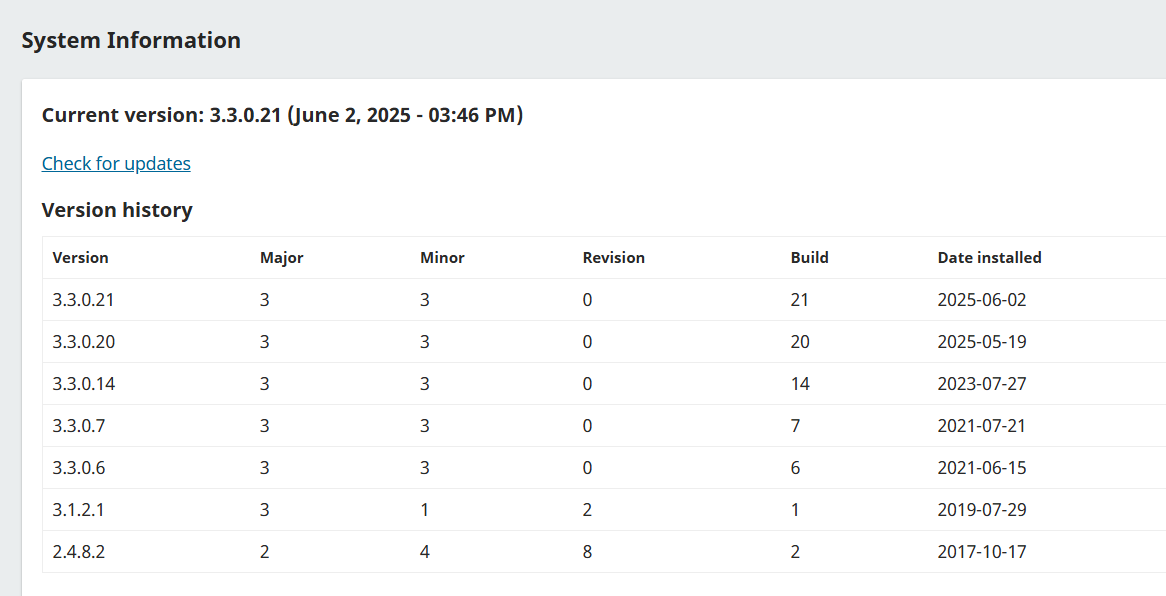
Your upgrade from a “known risky” OJS (3.3.0-14) to a “safe so far” OJS (3.3.0-20) was relatively recent – May 2025 – leaving quite a long period of time since the discovery of the XSS issue (which IIRC was late 2023) for someone to cause trouble that might persist with the upgraded installation.
The good news is that I haven’t seen any evidence that these attacks were particularly sophisticated; there probably aren’t deeply-hidden back doors or anything tricky like that. It’s likely that someone either created a privileged account, or exfiltrated an existing one’s password, and that cleaning that up should solve the problem.
I would suggest these steps:
- Delete any unexpected issues.
- Review the list of Journal Managers, Journal Editors, and Administrators to ensure there are no surprise entries. If there are, remove them.
- Use new, safe passwords for all the existing privileged accounts.
- Stay up to date with the newest releases.
I suspect that will resolve the problem. It is possible that something more devious is happening, e.g. a hidden back-door somewhere in the system; if you do see evidence of that, then it’ll be necessary to do more investigation on the server side.
I’m always attentive to the possibility that something new is going on here that I haven’t covered above – if you think that’s the case, please feel free to provide details to me, via private message if you think they’re sensitive (i.e. an undisclosed security problem).
Thanks,
Alec Smecher
Public Knowledge Project Team