Extracting a journal out of a multi-journals hosting environment

Describe the issue or problem
Please tell us what happens and what you expected to happen.

So one of our clients wants to move their journal to a new hosting environment. Their one journal is current hosted in our multi journals OJS environment, how can I extract the from data from database and upload files for the journal to give it to the other OJS hosting service.

Steps I took leading up to the issue
I do not know where to start and hoping I will get some help/pointers from here.

What application are you using?
OJS 3.3.0-20

Additional information
I know that PKP OJS hosting did this for us before in the past, but this time it is required that I have to do it. I hope you can help.

Best.
Dung.

1 Like

Hi @dung,

You may want to try the fullJournalTransfer plugin:

https://github.com/lepidus/fullJournalTransfer

Recommended method of installation is via the plugin gallery.

-Roger
PKP Team

Thank you @rcgillis I am going to try. This is great!

1 Like

Hi @dung,

I believe the process PKP hosting uses internally is to duplicate the entire installation, then on the new copy, delete all unwanted journals, leaving just the desired one.

Regards,
Alec Smecher
Public Knowledge Project Team

1 Like

Oh thank you the pointer @asmecher I will give it a try.

We do the same at Lepidus.

Additionally:

  • we remove users without roles; we should not send personal data that is not directly related to the journal
  • we check for content that does not belong to the journal coming out of this OJS (e.g., message logs/logs from other journals) and
  • on the web server, we add a redirect so that access to the journal’s content is forwarded to the same content on the new hosting.

As the fullJournalTransfer plugin will change the IDs of articles, issues, etc., we suggest it only for the opposite path, an independent OJS journal that needs to be hosted on an OJS with other journals.

3 Likes

Very useful information. I have been working on deleting journals, some of them I ran into problems and can not delete using the UI admin functions, so I had to manually ( using command line/database queries ) fix and massage some table records such as author_settings table by investigating php log error messages then I went back to webapp admin page and could delete them/journals successfully. I really appreciate any guidance and feedback, I am all ears and if any one need to know details of the steps I have taken just let me know I will share.

Thank you @abadan I hope you have a great weekend.

1 Like

Hi @dung,

Glad to hear you’re moving ahead. We introduced database integrity checks starting with 3.4, so once you upgrade to that (and especially to 3.5), the various weird cases you’ve been dealing with during this process will most probably go away.

Regards,
Alec Smecher
Public Knowledge Project Team

1 Like

Here is my issue and resolution:

Find this error from log file:

image

[26-Sep-2025 16:00:42 America/] PHP Fatal error: Uncaught TypeError: Cannot access offset of type string on string in
www/ojs-3.3.0-20/lib/pkp/classes/core/DataObject.inc.php:133 Stack trace:

#0 www/ojs-3.3.0-20/lib/pkp/classes/db/SchemaDAO.inc.php(243): DataObject->setData(‘biography’, ‘’, ‘en_US’)
#1 www/ojs-3.3.0-20/lib/pkp/classes/submission/PKPAuthorDAO.inc.php(134): SchemaDAO->_fromRow(Array)
#2 www/ojs-3.3.0-20/lib/pkp/classes/db/DAOResultFactory.inc.php(100): PKPAuthorDAO->_fromRow(Array)
#3 www/ojs-3.3.0-20/lib/pkp/classes/db/DAOResultIterator.inc.php(33): DAOResultFactory->next()
#4 www/ojs-3.3.0-20/lib/pkp/classes/db/DAOResultFactory.inc.php(182): DAOResultIterator->__construct(Object(DAOResultFactory))
#5 www/ojs-3.3.0-20/lib/pkp/classes/services/PKPAuthorService.inc.php(69): DAOResultFactory->toIterator()
#6 www/ojs-3.3.0-20/lib/pkp/classes/publication/PKPPublicationDAO.inc.php(62): PKP\Services\PKPAuthorService->getMany(Array)
#7 www/ojs-3.3.0-20/classes/publication/PublicationDAO.inc.php(39): PKPPublicationDAO->_fromRow(Array)
#8 www/ojs-3.3.0-20/lib/pkp/classes/db/DAOResultFactory.inc.php(100): PublicationDAO->_fromRow(Array)
#9 www/ojs-3.3.0-20/lib/pkp/classes/db/DAOResultIterator.inc.php(33): DAOResultFactory->next()
#10 www/ojs-3.3.0-20/lib/pkp/classes/db/DAOResultFactory.inc.php(182): DAOResultIterator->__construct(Object(DAOResultFactory))
#11 www/ojs-3.3.0-20/lib/pkp/classes/services/PKPPublicationService.inc.php(80): DAOResultFactory->toIterator()
#12 www/ojs-3.3.0-20/lib/pkp/classes/submission/PKPSubmissionDAO.inc.php(93): PKP\Services\PKPPublicationService->getMany(Array)
#13 www/ojs-3.3.0-20/lib/pkp/classes/db/DAOResultFactory.inc.php(100): PKPSubmissionDAO->_fromRow(Array)
#14 www/ojs-3.3.0-20/lib/pkp/classes/db/DAOResultIterator.inc.php(62): DAOResultFactory->next()
#15 www/ojs-3.3.0-20/classes/article/ArticleTombstoneManager.inc.php(57): DAOResultIterator->next()
#16 www/ojs-3.3.0-20/classes/services/ContextService.inc.php(134): ArticleTombstoneManager->insertTombstonesByContext(Object(Journal))
#17 www/ojs-3.3.0-20/lib/pkp/classes/plugins/HookRegistry.inc.php(107): APP\Services\ContextService->beforeDeleteContext(‘Context::delete
’, Array)
#18 www/ojs-3.3.0-20/lib/pkp/classes/services/PKPContextService.inc.php(504): HookRegistry::call(‘Context::delete
’, Array)
#19 www/ojs-3.3.0-20/lib/pkp/controllers/grid/admin/context/ContextGridHandler.inc.php(265): PKP\Services\PKPContextService->delete(Object(Journal))
#20 www/ojs-3.3.0-20/lib/pkp/classes/core/PKPRouter.inc.php(397): ContextGridHandler->deleteContext(Array, Object(Request))
#21 www/ojs-3.3.0-20/lib/pkp/classes/core/PKPComponentRouter.inc.php(257): PKPRouter->_authorizeInitializeAndCallRequest(Array, Object(Request), Array)
#22 www/ojs-3.3.0-20/lib/pkp/classes/core/Dispatcher.inc.php(144): PKPComponentRouter->route(Object(Request))
#23 www/ojs-3.3.0-20/lib/pkp/classes/core/PKPApplication.inc.php(360): Dispatcher->dispatch(Object(Request))
#24 www/ojs-3.3.0-20/index.php(68): PKPApplication->execute()
#25 {main} thrown in www/ojs-3.3.0-20/lib/pkp/classes/core/DataObject.inc.php on line 133

What the error means

  • OJS 3.3 treats some fields (like author biography) as localized values: internally they should be stored as an array keyed by locale (e.g., ['en_US' => '...']).

  • Your data has at least one author biography stored “wrong” (as a plain string or with a bad/NULL locale).

  • When OJS tries to delete the journal it builds tombstones and iterates authors → publications. While hydrating an Author object it does:

    setData(‘biography’, ‘’, ‘en_US’)
    but biography in memory is already a string, not an array — so PHP throws:

    “Cannot access offset of type string on string 
 DataObject::setData()”

Solution: remove just the problematic author biography rows for that journal, then retry the UI delete.

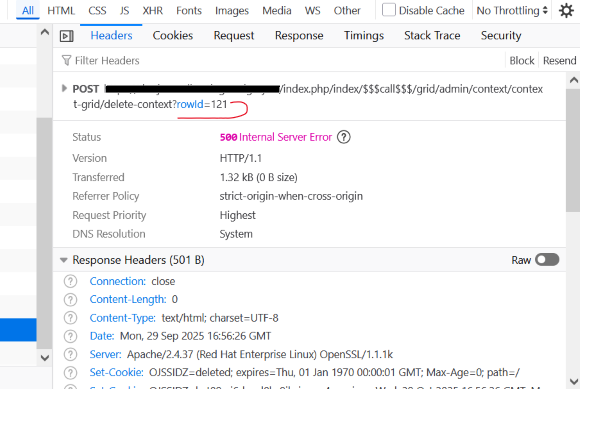
In this case 121 is the problematic record. Use your browser debug console and click on error 500 to see this detail and the journal ID 121:

Go to the backend database to delete it because, because the record data violation explained above (Your data has at least one author biography stored “wrong” (as a plain string or with a bad/NULL locale).) like so:@JID

-- 1) Pick the journal to delete:

SET @JID := 121;

-- 2) (Optional) See if there are any biography rows with bad/NULL locale in this journal:

SELECT s.author_id, s.locale, LENGTH(s.setting_value) AS lenFROM author_settings sJOIN authors a ON a.author_id = s.author_idJOIN publications p ON p.publication_id = a.publication_idJOIN submissions sub ON sub.submission_i@JID = p.submission_idWHERE sub.con@JIDext_id = @JID AND s.setting_name = ‘biography’;

-- 3) Simple & safe: drop all biography settings for this journal’s authors:

START TRANSACTION;

DELETE sFROM author_settings sJOIN authors a ON a.author_id = s.author_idJOIN publications p ON p.publication_id = a.publication_idJOIN submissions sub ON sub.submission_i@JID = p.submission_idWHERE sub.@JIDontext_id = @JID AND s.setting_name = ‘biography’;

COMMIT;

Now go back to the UI admin page / function and delete it - successfully!!! DONE.

Hello @asmecher

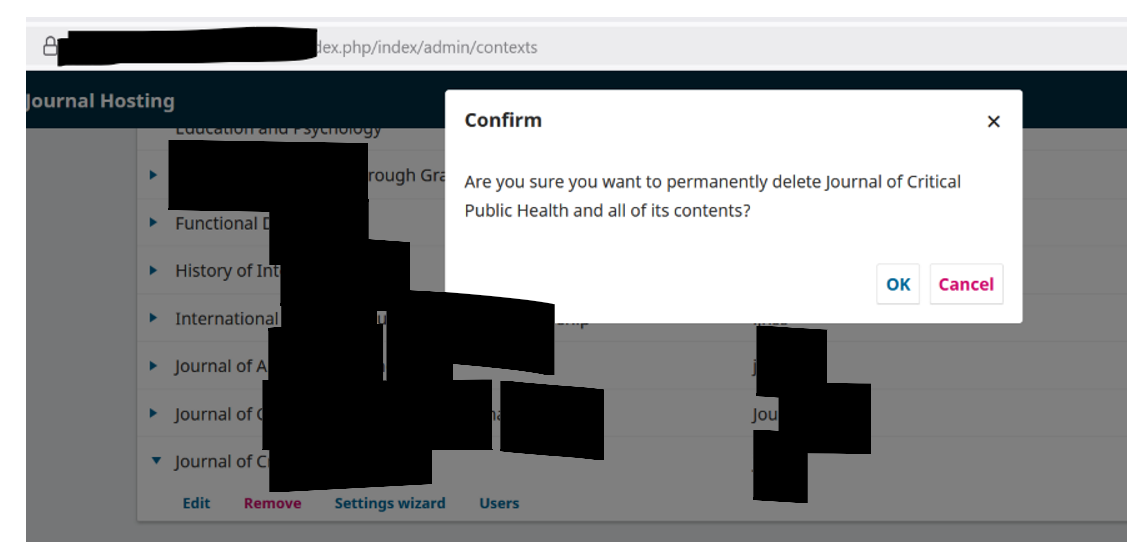
I was able to remove all other journals (Administration → Hosted Journals → Remove) leaving the target journal working as if this instance is one single journal ojs web application, then rebuilt search index successfully (I had to clean some orphan db records in publication_galleys table due to indexing errors). Can you point me what other things I need to do to hand over the journal to other hosting service, thank you for your time.

Dung.

Hi @dung,

Off the top of my head, the other thing to consider is the user database. The users table is a shared pool of all users used by all journals, so duplicating the installation and removing all but one journal won’t remove user accounts that were active in other journals. I don’t think this will be a problem, and I don’t recommend trying to delete these accounts en masse using e.g. the Merge Users tool unless you want to make work for yourself :slight_smile: – but something to be aware of. If you were e.g. handing this installation’s data off to a 3rd party you might need to be aware of the privacy implications.

Regards,
Alec Smecher
Public Knowledge Project Team

Thank you for the insight, I can confirm that all the users are there, and I feel more confident now in moving forward with identifying the best resolution, they probably want me to remove all other users who are not in target journal, and I’ll share my solution once I’ve finalized it. Appreciate the pointer!

1 Like

Be sure do this on your Dev and as a test before Prod.

in OJS the users table is site-wide, so after clone-and-prune you’ll still see accounts that don’t belong to the abc journal. The safest approach is:

  • Keep: users who have a role/group in abc or are site admins.

  • Remove (or first disable): everyone else.

first test run on your DEV/clone. It at least works for OJS 3.4 (uses the modern user_groups/user_user_groups mapping) and also preserves site admins.

0) Safety snapshot

-- One quick backup table (optional but recommended)
CREATE TABLE users_backup_$(date +%Y%m%d) LIKE users;
INSERT INTO users_backup_$(date +%Y%m%d) SELECT * FROM users;

1) Resolve abc → journal_id

SET @JPATHJPATH := ‘abc’;
SE@JIDECT @JID := journal_id FROM journals WHERE@JPATHpath = @J@JIDATH;
SELECT @JID AS abc_journal_id;

2) Build the “keep” set

  • Users in any abc user group

  • PLUS site admins (context-less admin role)

-- temp keep set
CREATE TEMPORARY TABLE keep_users (user_id INT PRIMARY KEY);

– (A) Users enrolled in ABC user groups
INSERT IGNORE INTO keep_users (user_id)
SELECT DISTINCT uug.user_id
FROM user_user_groups uug
JOIN user_groups ug ON ug.user_group_id = uug.user_group_id
WHERE @JIDg.context_id = @JID;

– (B) Site admins (role_id = 1) — context_id may be NULL or 0 depending on install
– If your install has no ‘roles’ table, this INSERT will simply fail; ignore and proceed.
INSERT IGNORE INTO keep_users (user_id)
SELECT DISTINCT r.user_id
FROM roles r
WHERE r.role_id = 1 AND (r.context_id IS NULL OR r.context_id = 0);

Preview what will be removed:

SELECT COUNT(*) AS total_users FROM users;
SELECT COUNT(*) AS keep_users FROM keep_users;
SELECT COUNT(*) AS to_remove
FROM users u
LEFT JOIN keep_users k USING (user_id)
WHERE k.user_id IS NULL;

make sure you don’t nuke yourself

-- keep your admin user explicitly (replace ‘your_admin_username’)
INSERT IGNORE INTO keep_users (user_id)
SELECT user_id FROM users WHERE username = ‘your_admin_username’;

Run your preview again if you want to double-check:

SELECT COUNT(*) AS total_users FROM users;
SELECT COUNT(*) AS keep_users FROM keep_users;
SELECT COUNT(*) AS to_remove
FROM users u LEFT JOIN keep_users k USING (user_id)
WHERE k.user_id IS NULL;

3) Option A (safer): Disable non-ABC users first

This hides them from logins/UI but preserves history. You can leave it here or proceed to hard delete after you verify.

UPDATE users u
LEFT JOIN keep_users k USING (user_id)
SET u.disabled = 1
WHERE k.user_id IS NULL;

Check Users & Roles now. If you still want them gone entirely, do Option B.

4) Option B (hard delete): remove non-ABC users everywhere

Run only after confirming you kept site admins and all ABC staff/editors.

START TRANSACTION;

– Dependent/many-to-one tables commonly referencing user_id:
DELETE n
FROM notifications n
LEFT JOIN keep_users k ON k.user_id = n.user_id
WHERE k.user_id IS NULL;

DELETE i
FROM user_interests i
LEFT JOIN keep_users k ON k.user_id = i.user_id
WHERE k.user_id IS NULL;

DELETE s
FROM sessions s
LEFT JOIN keep_users k ON k.user_id = s.user_id
WHERE k.user_id IS NULL;

DELETE us
FROM user_settings us
LEFT JOIN keep_users k ON k.user_id = us.user_id
WHERE k.user_id IS NULL;

DELETE uug
FROM user_user_groups uug
LEFT JOIN keep_users k ON k.user_id = uug.user_id
WHERE k.user_id IS NULL;

– If your install still uses the roles table, prune any leftovers (harmless if empty)
DELETE r
FROM roles r
LEFT JOIN keep_users k ON k.user_id = r.user_id
WHERE k.user_id IS NULL;

– Optional: API keys / access tokens tables (present on some installs)
DELETE ak FROM api_keys ak LEFT JOIN keep_users k ON k.user_id = ak.user_id WHERE k.user_id IS NULL;
DELETE uak FROM user_access_keys uak LEFT JOIN keep_users k ON k.user_id = uak.user_id WHERE k.user_id IS NULL;

– Finally, delete the user accounts themselves
DELETE u
FROM users u
LEFT JOIN keep_users k USING (user_id)
WHERE k.user_id IS NULL;

COMMIT;

If any of those tables don’t exist in your schema, skip that DELETE line.
If MySQL complains about foreign keys (rare in 3.3), run the block with SET FOREIGN_KEY_CHECKS=0; at the top and =1; at the end.

5) Verify

-- Only ABC users (plus site admins) should remain
SELECT u.user_id, u.username, u.email
FROM users u
LEFT JOIN keep_users k USING (user_id)
ORDER BY (k.user_id IS NOT NULL) DESC, u.username
LIMIT 50;

– How many total left
SELECT COUNT(*) AS remaining_users FROM users;

Notes & gotchas

  • Authors vs. Users: Article authors in OJS are not necessarily “users”; deleting users won’t erase authors records linked to publications.

  • Your own account: If your admin is site-level, it’s preserved by the site-admin rule. If you’re enrolled in ABC, it’s preserved by the ABC group rule.

  • UI caching: The “Users & Roles” grid sometimes caches filters. Reload the page after changes.

Done.

2 Likes

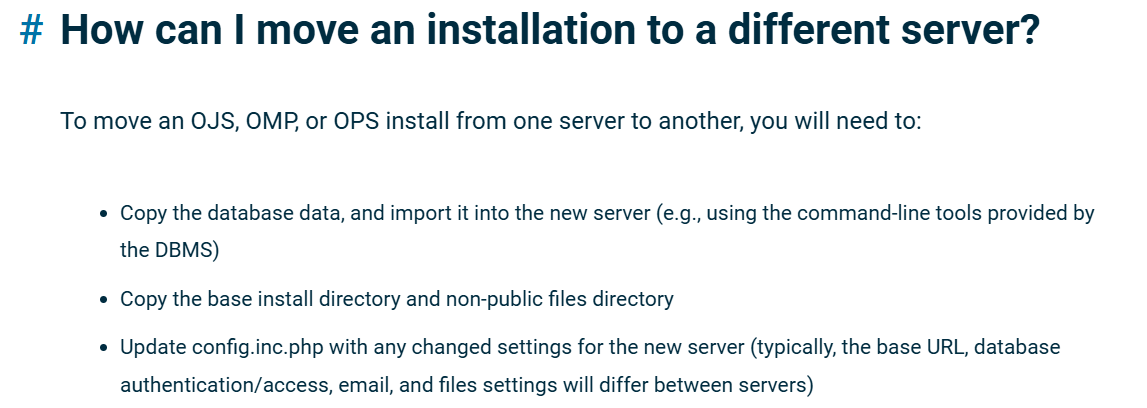
Hi @asmecher I know I have been asking a few questions but one more question is the best how to way to export and package a journal (uploaded files, public dir, database, config.php etc) and send it to other hosting service? Thank you so much for your time.
Dung.

Update:

I found this doc: https://docs.pkp.sfu.ca/faq/en/site-administration?utm_source=chatgpt.com

Hi @dung,

Yup, that’s a good reference! Of course, if you don’t want to send the whole installation directory, then the public directory, config.inc.php file, and notes about any extra plugins would do.

Regards,
Alec Smecher
Public Knowledge Project Team

1 Like

This topic was automatically closed after 10 days. New replies are no longer allowed.