Email template variables in OJS 3.5

Hello,

We’ve recently upgraded a sandbox journal from OJS 3.3 to 3.5. Through testing, we’ve noticed that a few variables don’t populate in some of the email templates (i.e. email text includes the variable name itself rather than the text that should replace it).

This issue can be replicated by working through an editorial process corresponding to one of the affected templates (e.g. declining a submission pre-review) and viewing the sent email in the activity log:
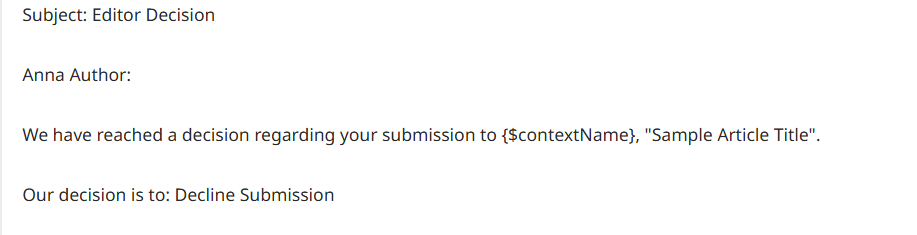
Here is a list of the affected variables and templates:

{$contextName}

Affected Templates:

  • Sent to Review

  • User Invited to Role Notification

  • Submission Declined (Pre-Review)

  • Revisions Requested

  • Reviewer Commented Notify Editors

  • orcidCollectAuthorId

  • orcidRequestAuthorAuthorization

{$editorialContactName}

Affected Templates:

  • Reviewer Commented Notify Editors

{$editorialContactSignature}

Affected Templates:

  • Submission Confirmation

{$principalContactSignature}

Affected Templates:

  • orcidCollectAuthorId

  • orcidRequestAuthorAuthorization

{$recommendation}

Affected Templates:

  • Reviewer Commented Notify Editors

{$passwordResetURL}

Affected Templates:

  • Review Reminder (Automated)

  • Review Response Overdue (Automated)

{$authorName}

Affected Templates:

  • orcidCollectAuthorId

  • orcidRequestAuthorAuthorization

{$articleTitle}

Affected Templates:

  • orcidRequestAuthorAuthorization

{$filename}

  • Does not populate in the activity log (not in any email templates):

We’ve seen some similar issues already documented in the GitHub (e.g. with the {$contextAcronym} variable), so apologies if any/all of these instances are duplicates. If there’s any way to fix this issue (other than manually changing the variables), we would love to hear about it!

Thank you!

Hello and welcome to the community with your first post @sarahfr . This is a great list. I will bring it to the team and see if we can’t find a more robust approach to fixing all of them. As you have noticed we have a few of those covered as issues to be fixed in upcoming patches (see below).

{$contextAcronym} - #10962

{$filename} - #11997

{$reviewAssignment} - #10045

Hi @sarahfr and @grierb, we just upgraded to 3.5 and are experiencing these same issues, have you perhaps managed to find a solution or workaround in the meantime? Thank you.

@SAJS09 What version did you upgrade to for 3.5? Was it the recent release 3.5.0-4? I noticed that 2 out of 3 of the tickets I linked have not been completed.

Hi, we updated to version 3.5.0.4, and we have the same problems, the email templates don’t load.
Any Solution??

I may have interpreted the steps incorrectly. How are you adding the variables? Is it when the email workflow comes up and you select Insert Content or are you editing the template and adding these variables?

Are they accurately being rendered in the email but not in the activity log?

When I tried to Insert Content for example, {$contextName} it automatically converted the variable into a string in the email preview.

Also, some variables might not be able to be rendered correctly until they can gather information about the Journal context. They will remain unrendered in the activity log.

I Couldn’t reproduce the following on 3.5.0-4. Either by first editing the template and then going through email process or first going through email process and using Insert Content option:
for {$contextName}

  • Submission Declined (Pre-Review)

  • User Invited to Role Notification

  • Reviewer Commented Notify Editors

  • Sent to Review

image

I did notice that these variables might no longer exist and you may have to fix your templates to remove them. I couldn’t check them all but here are some I checked. If you are experiencing the same problem on 3.5.0-4 then the templates must be loading but the variables aren’t rendering? I think they don’t exist and are being interpreted as text.

for {$editorialContactName} ← this variable doesn’t exist

Affected Templates:

  • Reviewer Commented Notify Editors

{$editorialContactSignature} ← this variable doesn’t exist

Affected Templates:

  • Submission Confirmation

{$principalContactSignature} ← this variable doesn’t exist

Affected Templates:

  • orcidCollectAuthorId

  • orcidRequestAuthorAuthorization

What you describe in the second part of your response is consistent with what we’re seeing. Some variables in the default OJS 3.5 templates do not exist and as such are interpreted as text. They do not render in the activity log or in sent emails. When I click “Insert Content,” none of the variables listed in my above post are included in the list of variables that can be inserted.

There are a few variables that work in some templates but not in others. These are:

  • {$recommendation}, which works in the Recommendation Made template, but does not work in the Article Review Completed Template.
  • {$authorName}, which only does not work in the ORCID templates (orcidCollectAuthorId and orcidRequestAuthorAuthorization).
  • {$articleTitle}, which only does not work in the orcidRequestAuthorAuthorization template.

The easiest way to fix this issue is to replace the unrecognized variable with a functioning variable, using the “Insert Content” button to edit the template. When a variable works in some templates but not others, I only replace it in the affected templates. Here is how I have been replacing the variables:

{$contextName} (original variable) → {$journalName} (fixed variable)

{$editorialContactName}{$contactName}

{$editorialContactSignature}{$journalSignature}

{$principalContactSignature}{$journalSignature}

{$recommendation}{$reviewRecommendation}

{$passwordResetUrl}{$passwordLostUrl}

{$authorName}{$authors}

{$articleTitle}{$submissionTitle}

{$filename}{$submissionID}

These variables must be replaced after upgrading to 3.5, because the changed variable names typically aren’t recognized in 3.3, and the ones that break in 3.5 work in 3.3. (For instance, {$contextName} works in 3.3 and {$journalName} does not, but the opposite is true in 3.5.)

So far, we’ve upgraded two sandboxes and one production journal to 3.5. While changing the variable names manually works, it would be wonderful to have a more permanent fix!

@sarahfr Thanks for the list. I found this ticket as well : Deprecated email template variables require migration · Issue #9158 · pkp/pkp-lib · GitHub

Not sure when it would be released as it would require a migration.

@grierb Thanks for pointing out the ticket, I’ll keep an eye on it.

One correction to my reply - the correct replacement for {$authorName} is:

{$authorName}{$recipientName}

Thanks for the update @sarahfr. I linked this post as reference in the migration ticket.

So to mitigate the problem (for others) it appears that those email template variables will have to be manually updated until a proper migration can be implemented. After it is implemented it should resolve those other tickets I mentioned.

Hi @grierb @sarahfr,

Chiming in to share a similar experience on our OJS instance. We’re on 3.5.0-3 and we’re experiencing similar issues, with some differences from what you’ve described. When we upgraded to 3.5.0 we found about 10 email templates with variables that don’t resolve in sent emails, including several mentioned here. For example, {$contextName} didn’t resolve and we had to replace it with {$journalName}.

However, we recently upgraded to 3.5.0-3. Some of the templates were fixed in this upgrade so they no longer contain variables that don’t resolve (for example, {$editorialContactName} (mentioned above) no longer appears in our default templates). However the variables {$journalName}, {$journalUrl,} and {$journalSignature} (used in most templates) do not resolve anymore and instead must be manually tracked down and replaced with {$contextName}, {$contextUrl} and {$contextSignature}. I also found two email templates where {$passwordResetUrl} is used in the default template but it doesn’t exist in the ‘insert content’ list and must be replaced with {$passwordLostUrl}. The affected templates are ‘Review Reminder (Automated)’ and ‘Review Response Overdue (Automated)’. This is confusing because there is still at least one template (Password Reset Confirm) that does use the {$passwordResetUrl} variable

In github PR #4898, it appears that the developers at one point considered switching to the {$journalName} syntax, but ultimately decided to stay with {$contextName} (etc) to be more consistent across PKP. However, it seems like when we upgraded to 3.5.0-1 it did switch to JournalName and then switched back to contextName by 3.5.0-3 but crucially without actually updating the email templates, so the old journalName etc variables don’t work but they’re still written into the email templates.

We’ve also had a few edge case experiences in 3.5.0-3 where variables do appear in the ‘insert content’ list for an email template, but they don’t resolve in the sent emails. We experienced this in the ‘Review Reminder (Automated)’ email with {$contextName} and {$submissionTitle} which appear in the ‘insert content’ list for that email template, but didn’t resolve in the email sent to a reviewer. All other variables in this email did resolve as expected, and {$contextName} and {$submissionTitle} seem to be the correct variable names in 3.5.0-3 so we haven’t figured out what’s going on there or how to correct the problem.

If anyone has suggestions on how we could fix these issues more easily than editing each email template individually we’d be very interested to hear them.

@allia

I have updated the ticket #9158 with all of the variables that are having issue above so we can look into it. I’m not sure of another way to fix the issue besides manually going through each template and adjusting them. You might be able to replace them with a DB query but I would advise against it as it can quickly replace more than you expect.

Note:
When I check my default templates for Review Reminder (Automated) and Review Response Overdue (automated) I’m not seeing {$passwordLostUrl}. And generally speaking this doesn’t seem like that template would have that variable. It is a review reminder and shouldn’t be referencing a password reset so it might have been manually added.

Also when I scanned the DB for any template with the {$passwordLostUrl} I couldn’t find any templates so I’m not sure if there is a direct conversion for {$passwordResetUrl} → {$passwordLostUrl}.

Sorry for the late reply, but yes 3.5.0.4. Will take a look at all the responses that followed.