I wonder if the issue we are facing is related to the issue described here in this thread. We are using OJS 3.4.0.8 (recently upgraded from 3.3.0.8) and we use DataCite for DOI registration.
I recently published the first article since the upgrade and wanted to register the DOI. However, the status of the DOI remains on submitted. The message in the DOI table within OJS reads “DataCite: This item has been manually registered with a registration agency.”
Nobody has done any registering manually. When checking our Datacite account, no data was received there. In the OJS in administration → jobs → failed jobs there seems to be something related to the issue that includes the submission ID of the submission I wanted to register
I’m jumping into the discussion, reporting my experience. I tried the test version of datacite about a year and a half ago, so as not to immediately use the regular account and risk writing wrong Doi.
with the test login I have never managed to write a Doi automatically on Datacite, and then I gave up.
the certain thing is that exporting the xml from Ojs creates incorrect fields, which I always find myself correcting manually, before inserting the doi on Datacite.
I wouldn’t want the error to be dictated by this.
thanks for moving this to a separate thread.
I have checked several things now but am none the wiser yet.
XML export works for the submission in question. I took the exported XML manually to DataCite (import via the Fabrica user interface) and DataCite accepted the XML for DOI registration. So the XML should be fine.
At DataCite, I noticed that OJS had registered several DOIs from a 2014 journal issue the day after our OJS upgrade to 3.4.0.8 was complete. Apparently, once I opened the DOI interface for first use, OJS checked the status of all DOIs for that journal (around 400). It registered a handful of submissions from 2014 and lists them now as ‘registered’ in the DOI table. Those might be from a time before we used the DataCite Plugin and forgot to register those specific DOIs manually. Most others from this year are marked as ‘submitted’ as we indeed registered them manually.
There are some submissions with DOIs marked as ‘submited’ where I am absolutely sure we already used the DataCite Plugin for DOI registration (2016 and 2017). This concerns only one or two DOIs in a year were all other are marked as ‘registered’. I haven’t figured out what sets those submissions / DOIs apart.
I will see if I find another submission ready for DOI registration, try again and have a close look at the error log while doing it.
I tried to register a new DOI for another submission in the same journal. It failed the same way.
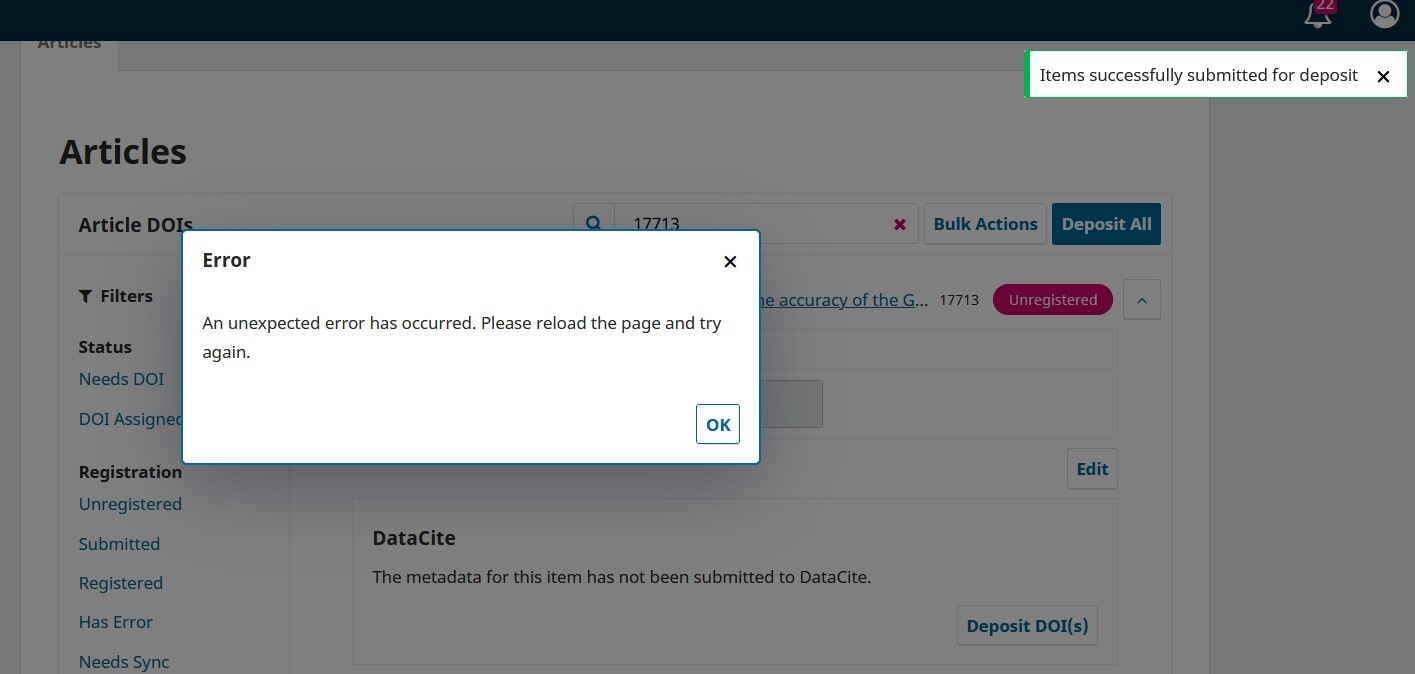
For a published submission, I entered the DOI into the DOI table and with “BULK actions → Deposit DOI” I tried to deposit with DataCite. On the top right corner, the small message “Items successfully submitted for deposit” appears, but at the same time, another window in the middle of the screen tells me “An unexpected error has occured. Please reload the page and try again.” The status of the submission is set to ‘submitted’.
There seems to be nothing related in the php error log. However, there is another failed job in the failed job queue with a relevant time stamp. When clicking on “try again” for this job, the window “An unexpected error has occured. Please reload the page and try again.” pops up again.
We use the built-in job runner with pre-set values.
Sorry for such a late response – I first now found out that some users have a problem registering DataCite DOIs…
Does the problem still exist?
Some users had similar problem with mEDRA plugin, and it seems we were able to fix it. I will try to fix DataCite plugin in the same way. I will provide a fix, that I would then ask you to test it, would that work?
thanks for the feedback. Yes, the problem still exists. We are currently registering DOIs via xml export and import in Fabrica but would appreciate a fix to allow for automated registration.
We would be happy to help pin down the problem with testing an improved plugin but it might be with a bit of delay on our side.
While working on the DNB plugin problem, we noticed that our file system setup might differ from what OJS is expecting. I will point my admin to this and ask him to check. PHP error log indicates something in that direction:
AH01071: Got error ‘PHP message: PHP Warning: file_exists(): open_basedir restriction in effect. File(volltexte/temp) is not within the allowed path(s): (/var/www/disabled/:/var/www/auto_prepend/:/usr/share/php/:/tmp/:/dev/urandom:/var/www/ojs.domain.de/:/bin/tar:/usr/bin/perl:/bin/egrep:/bin/gzip) in /var/www/ojs.domain.de/lib/pkp/classes/file/FileManager.php on line 505; PHP message: PHP Warning: file_exists(): open_basedir restriction in effect. File(volltexte/temp) is not within the allowed path(s): (/var/www/disabled/:/var/www/auto_prepend/:/usr/share/php/:/tmp/:/dev/urandom:/var/www/ojs.domain.de/:/bin/tar:/usr/bin/perl:/bin/egrep:/bin/gzip) in /var/www/ojs.domain.de/lib/pkp/classes/file/FileManager.php on line 479; PHP message: PHP Warning: file_exists(): open_basedir restriction in effect. File(volltexte) is not within the allowed path(s): … … … PHP message: ojs2: There are no readable files in this directory tree. Are safe mode or open_basedir active?’, referer: https://ojs.domain.de/index.php/journalname/dois
Does that tell you anything? Is there something specific that I can check?
On a side note: How do I make test DOI registrations with DataCite? DataCite no longer uses Test-Prefixes. They work with another URL instead (https://mds.test.datacite.org/), but the user cannot change the URL for registration in the dashboard. (For the test above, I used a freshly published article in need for a real DOI registration.)
DataCite plugin saves XML files in the folder temp/ under OJS files folder. So maybe your server settings have not considered this path/folder?
When you look at the failed jobs, do you see that job (to deposit Submissions) there? If so, what is the error message there?
Regarding testing: We have that URL (https://mds.test.datacite.org/) in code, and it should be used when the Testing option is enabled (under Settings > Distribution > DOIs > Registration > Registration Agency = DataCite).
According to this web page https://support.datacite.org/docs/testing-guide, one should ask for a test account, then create a test repository and thereby one gets the test prefix automatically assigned. Has that procedure changed now?