We recently upgraded our journal platform to OJS 3.5 (xlescience.org). However, we are encountering an issue where uploaded articles are not opening directly in the browser. Instead, they can only be downloaded.
Based on the suggestions in the PKP forum, I attempted the following steps:
Added the appropriate MIME types
Updated the .htaccess file
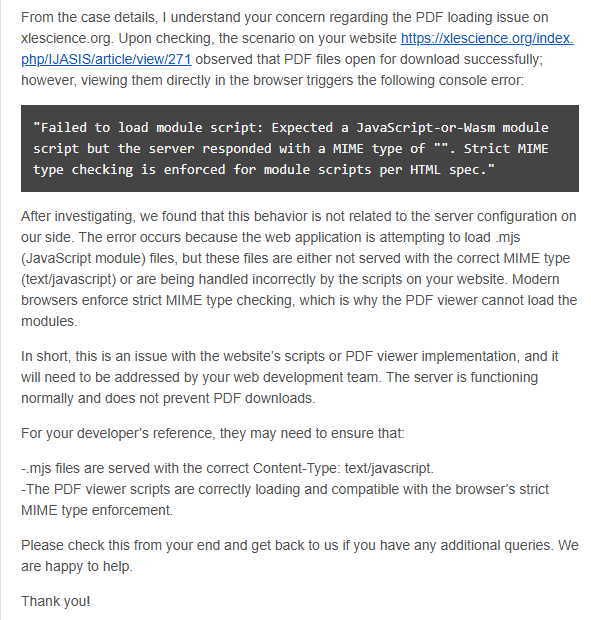
Unfortunately, these changes did not resolve the issue. We also contacted our hosting provider, and they confirmed that the server configuration seems fine. Their reply is provided below for your reference:
Could you please advise on how to resolve this issue? We would greatly appreciate any guidance or troubleshooting steps to ensure that articles open directly in the browser as expected.
I pulled your post into a separate post as it might be a different issue than that which described on the other forum post you posted under. Are you (or your hosting team) able to access your PHP error logs and report on errors found there? Often times there are clues that are found in those log messages that can help to pinpoint what might be causing these type of issues.
Thanks for following up on these additional details. I’m not entirely sure what might be causing this, but I will flag it for our team to have a look at when they are avaialble.
The solution is to configure your webserver to serve .mjs files with the appropriate MIME type (text/javascript). This is typically done through CPanel. See for example:
We have already reviewed the referenced thread and configured the necessary MIME settings in our cPanel. However, this has not resolved the issue, and the problem persists.
We checked the config.inc.php file, and the mime_database_path setting is commented out by default:
[finfo]
; mime_database_path = /etc/magic.mime
We do not have a magic.mime file on our server. However, we uncommented it and cleared all caches and tested again, but the issue remains unresolved.
Additionally, we removed the pdf.js viewer plugin and attempted to install a new plugin. Although the installation was successful, the plugin does not appear in the “Installed Plugins” gallery.
Could you please advise on the following:
Whether the missing magic.mime file could be causing this issue, or if PHP’s default fileinfo handling is sufficient.
Why newly installed plugins might not appear in the plugin gallery despite successful installation.
None of those settings/actions will affect the problem you’re encountering with mjs files; be careful about changing unrelated settings/code, as you might cause problems elsewhere in the system.
…then your web server needs to be configured to serve .mjs files with the application/javascript MIME type. Nothing else will fix the problem. This configuration is done outside of OJS, at the web server level, and the details of how to do this will vary from host to host.
Regards,
Alec Smecher
Public Knowledge Project Team
The best way to re-install that plugin after deleting it is to get the plugins/generic/pdfJsViewer directory from the .tar.gz download of the same version of OJS that you’re using. Move that directory’s contents from the download into the same location in your installation. That plugin comes with OJS, so we don’t make stand-alone packages of it available for all releases.
Regards,
Alec Smecher
Public Knowledge Project Team
Thank you for your guidance. I will download the .tar.gz file of the same OJS version we are using and copy the plugins/generic/pdfJsViewer directory contents into the corresponding location in our installation, as suggested.
After completing this step, I checked the system, and I can now confirm that the pdfJsViewer plugin is visible under the list of installed plugins. However, the PDF files are not opening within the browser.
I appreciate your clarification that this plugin is bundled with OJS and not available as a standalone package.
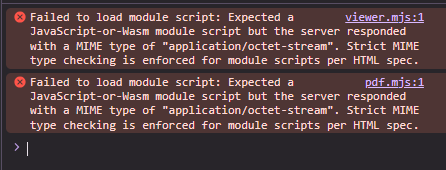
pdf.mjs:1 Failed to load module script: Expected a JavaScript-or-Wasm module script but the server responded with a MIME type of “”. Strict MIME type checking is enforced for module scripts per HTML spec.
viewer.mjs:1 Failed to load module script: Expected a JavaScript-or-Wasm module script but the server responded with a MIME type of “”. Strict MIME type checking is enforced for module scripts per HTML spec.
I have shared your previous response with our host provider and am waiting for their reply.
Finally, the articles are now opening in the browser without any issues.
Based on the information provided in the PKP forum, we had configured the MIME type to serve .mjs. However, the problem persisted because the browser cache had not been cleared. As suggested by the hosting provider, we cleared the browser cache, and the PDF files are now opening correctly.
The response from our hosting provider is as follows:
From the case details, I’m glad to know that you can now access the PDF file from your end. It seems that the below-provided Add Type code was added recently in the .htaccess file, which fixed the issue.
Also, the error you experienced before when trying to access the PDF page might have been caused by your browser cache. Browser caching can sometimes prevent updated content from displaying correctly. Hence, we suggest clearing the browser cache, which will help you in accessing your website without any issues.