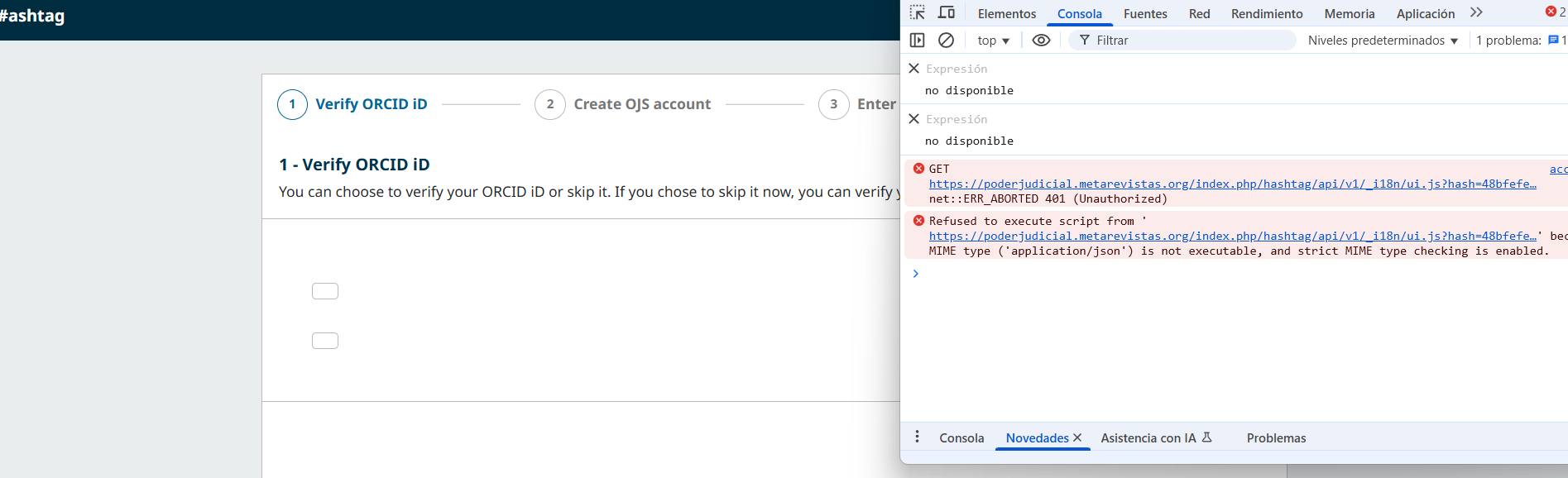
I’m working with OJS 3.5 and I’m getting a 401 Unauthorized error when the frontend tries to load the UI translation file from this path:
/index.php/[context]/api/v1/_i18n/ui.js
This is breaking the public site interface because the browser refuses to load the file due to the wrong MIME type and missing authorization:

lua


Refused to execute script ... MIME type ('application/json') is not executable ... 401 Unauthorized
I’ve confirmed that:
- Apache is configured to allow access to this route
- The request still gets blocked by OJS and returns a JSON error saying the user is not authorized.
Has anyone else experienced this?
I think you should download OJS 3.5 from official website https://pkp.sfu.ca/software/ojs/download/
Do not download from github
Hi, I have exactly the same problem. I downloaded the installer from the page indicated.
Failed to load resource: the server responded with a status of 401 (Unauthorized) ui.js:1
Thank you for the recommendation.
I confirm that I downloaded OJS 3.5 from the official PKP website:
https://pkp.sfu.ca/software/ojs/download/
I did not use the GitHub version.
Hi all,
See For anonymous OJS users: ui.js (which generates locale strings) is not available if allowed_hosts is not set · pkp/pkp-lib · Discussion #10491 · GitHub – I suspect you have not set the allowed hosts setting in your configuration file.
See config.TEMPLATE.inc.php for an example, and review the release notes for further information.
Regards,
Alec Smecher
Public Knowledge Project Team
Hi, yes, that’s it works. Thank you for the help!